> ## Documentation Index
> Fetch the complete documentation index at: https://docs.occtoo.com/llms.txt
> Use this file to discover all available pages before exploring further.
# Add a property to a card
> Map a data source property onto a card, or create a new source property from the card.
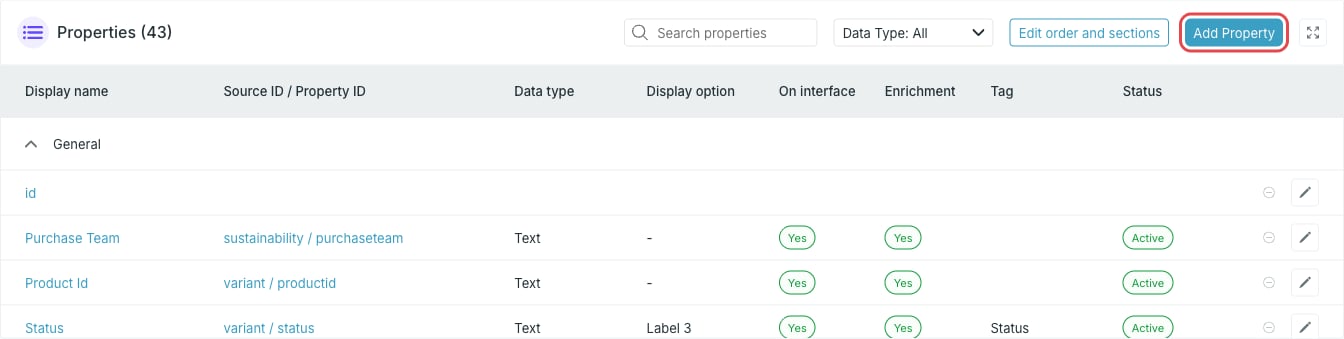
Properties are added from the **Properties** widget on the card page. You can add properties to a card in any status except **Archived** and **Updating**.
Open the card and press **Add Property** in the **Properties** widget.
 The **Add new property** dialog groups its fields into **Basic settings**, **Interface settings** and **Advanced settings**. The first two are open by default.
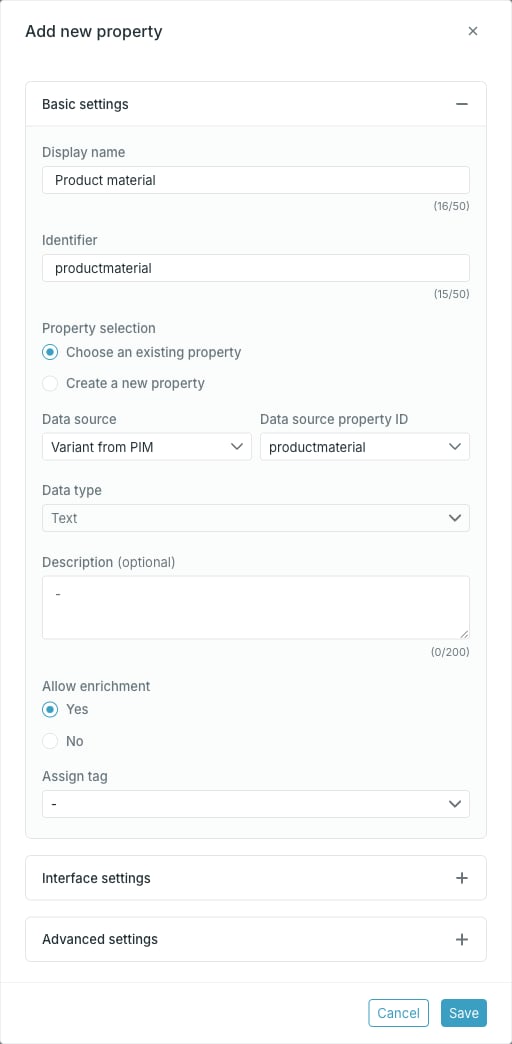 * **Display name** — required. The name shown in Studio.
* **Identifier** — required. This is the name destinations using this card will see. It is derived from the display name as you type, until you edit it yourself.
* **Property selection** — **Choose an existing property** maps a property that already exists in the data source. **Create a new property** writes a new property to the source instead.
* **Data source** — required. Only sources the card is built on, plus sources that share IDs with them, are listed.
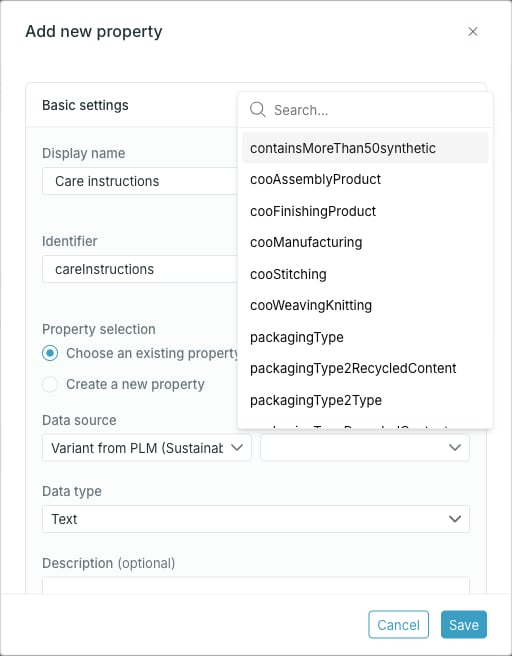
* **Data source property ID** — required. Searchable list of the properties in the selected source.
* **Data type** — required.
* **Delimiter** — required for **List** and **Localized list**: the character that separates values in the source, such as `|`.
* **Description** — optional.
* **Allow enrichment** — whether the value can be edited on an entry in the catalog.
* **Assign tag** — connects the property to a managed tag list.
Picking a property in **Data source property ID** replaces **Identifier** with the identifier suggested by the source, so set the identifier after choosing the property, not before.
* **Display name** — required. The name shown in Studio.
* **Identifier** — required. This is the name destinations using this card will see. It is derived from the display name as you type, until you edit it yourself.
* **Property selection** — **Choose an existing property** maps a property that already exists in the data source. **Create a new property** writes a new property to the source instead.
* **Data source** — required. Only sources the card is built on, plus sources that share IDs with them, are listed.
* **Data source property ID** — required. Searchable list of the properties in the selected source.
* **Data type** — required.
* **Delimiter** — required for **List** and **Localized list**: the character that separates values in the source, such as `|`.
* **Description** — optional.
* **Allow enrichment** — whether the value can be edited on an entry in the catalog.
* **Assign tag** — connects the property to a managed tag list.
Picking a property in **Data source property ID** replaces **Identifier** with the identifier suggested by the source, so set the identifier after choosing the property, not before.
 The identifier has to be unique on the card.
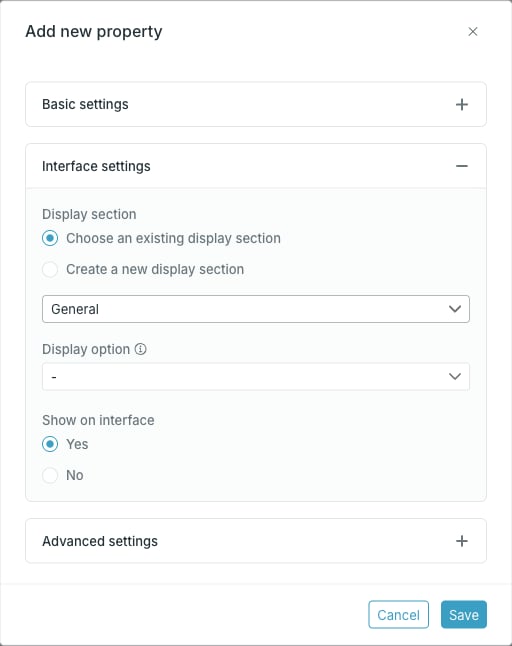 * **Display section** — **Choose an existing display section** picks one of the card's sections; **Create a new display section** lets you type a new name.
* **Display option** — which slot on an entry card this property fills. See [Display sections and display options](/guides/studio/cards/display-sections-and-options).
* **Show on interface** — **Yes** shows the property on entries in the catalog, **No** hides it while keeping it available to destinations.
Press **Save**. **Save** stays disabled until you change something.
On a **Draft** card the property is added straight away. On an **Active** card it is added as a pending change and appears with status **New** until you press **Activate card** — see [Work with pending changes](/guides/studio/cards/pending-changes).
## Data type and delimiter come from the source
When you map an existing source property, the source decides the type. If the source pins a type and offers no conversions, **Data type** and **Delimiter** are locked, and the tooltip offers an **Open data source page** link to change it at the source.
* **Display section** — **Choose an existing display section** picks one of the card's sections; **Create a new display section** lets you type a new name.
* **Display option** — which slot on an entry card this property fills. See [Display sections and display options](/guides/studio/cards/display-sections-and-options).
* **Show on interface** — **Yes** shows the property on entries in the catalog, **No** hides it while keeping it available to destinations.
Press **Save**. **Save** stays disabled until you change something.
On a **Draft** card the property is added straight away. On an **Active** card it is added as a pending change and appears with status **New** until you press **Activate card** — see [Work with pending changes](/guides/studio/cards/pending-changes).
## Data type and delimiter come from the source
When you map an existing source property, the source decides the type. If the source pins a type and offers no conversions, **Data type** and **Delimiter** are locked, and the tooltip offers an **Open data source page** link to change it at the source.
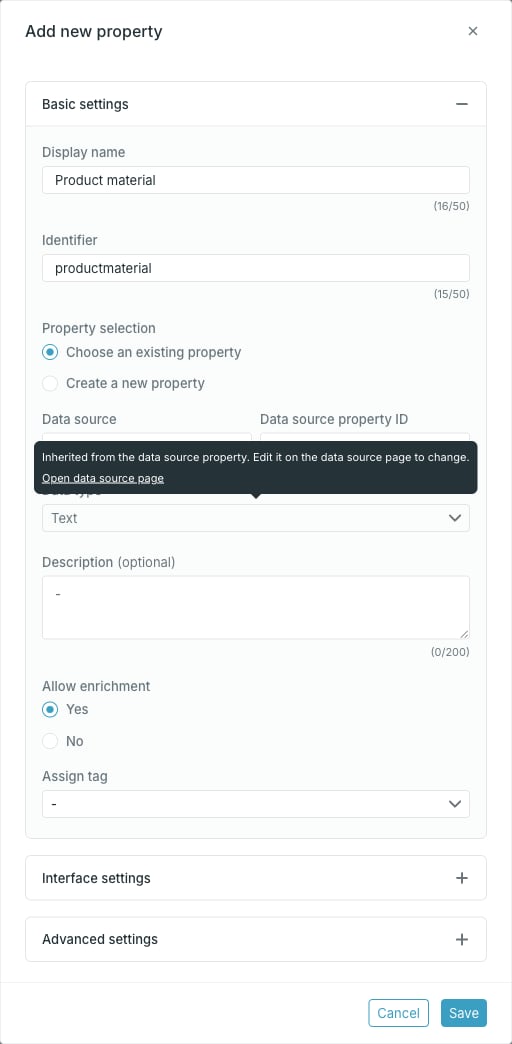 If the source property defines allowed conversions, **Data type** offers the source type plus those conversion targets. Choosing a conversion target fills in that target's delimiter for you.
To use a type the source does not offer, change the property, or its allowed conversions, on the data source itself.
## Creating a new source property from the card
Pick **Create a new property** when the value does not exist in the source yet. The first field becomes **Save property to data source** and **Data source property ID** becomes a free-text field, prefilled from the identifier. **Data type** is yours to choose, because no source property constrains it.
If the source property defines allowed conversions, **Data type** offers the source type plus those conversion targets. Choosing a conversion target fills in that target's delimiter for you.
To use a type the source does not offer, change the property, or its allowed conversions, on the data source itself.
## Creating a new source property from the card
Pick **Create a new property** when the value does not exist in the source yet. The first field becomes **Save property to data source** and **Data source property ID** becomes a free-text field, prefilled from the identifier. **Data type** is yours to choose, because no source property constrains it.
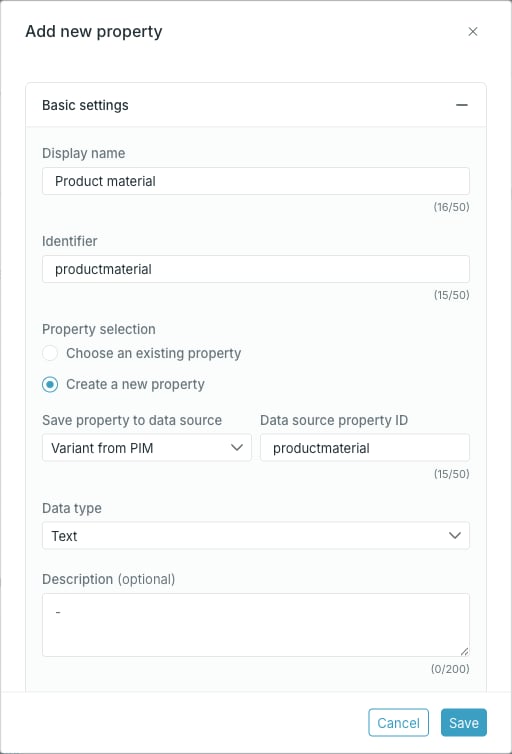 Saving creates the property in the data source as well as on the card. The data source property ID has to be unique in that source. Studio lowercases the ID it sends.
## Advanced settings
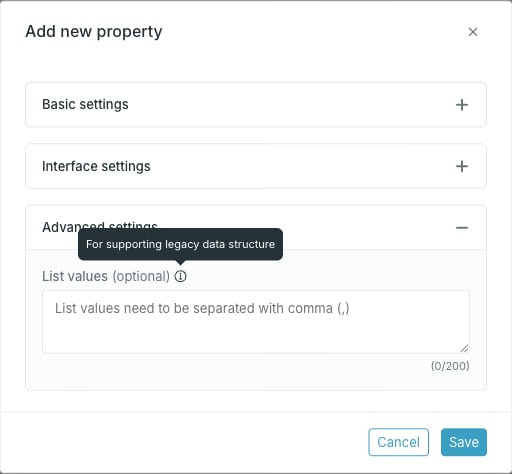
**Advanced settings** is collapsed by default and only appears for the **Text** and **List** data types. It holds **List values**, a comma-separated list kept for legacy data structures.
Saving creates the property in the data source as well as on the card. The data source property ID has to be unique in that source. Studio lowercases the ID it sends.
## Advanced settings
**Advanced settings** is collapsed by default and only appears for the **Text** and **List** data types. It holds **List values**, a comma-separated list kept for legacy data structures.
 ## Tags
**Assign tag** connects the property to a managed tag list. When a tag is set and the data type is **Text** or **List**, an extra **Use the key of the tag** choice appears: **Yes** stores the tag's key, **No** stores its value.
For **Text** and **List** properties, a Localized Text tag list can only be used key-based, so **No** is rejected.
## Tags
**Assign tag** connects the property to a managed tag list. When a tag is set and the data type is **Text** or **List**, an extra **Use the key of the tag** choice appears: **Yes** stores the tag's key, **No** stores its value.
For **Text** and **List** properties, a Localized Text tag list can only be used key-based, so **No** is rejected.