> ## Documentation Index
> Fetch the complete documentation index at: https://docs.occtoo.com/llms.txt
> Use this file to discover all available pages before exploring further.
# Card details
> What the card details shows: status, usage, properties and relations.
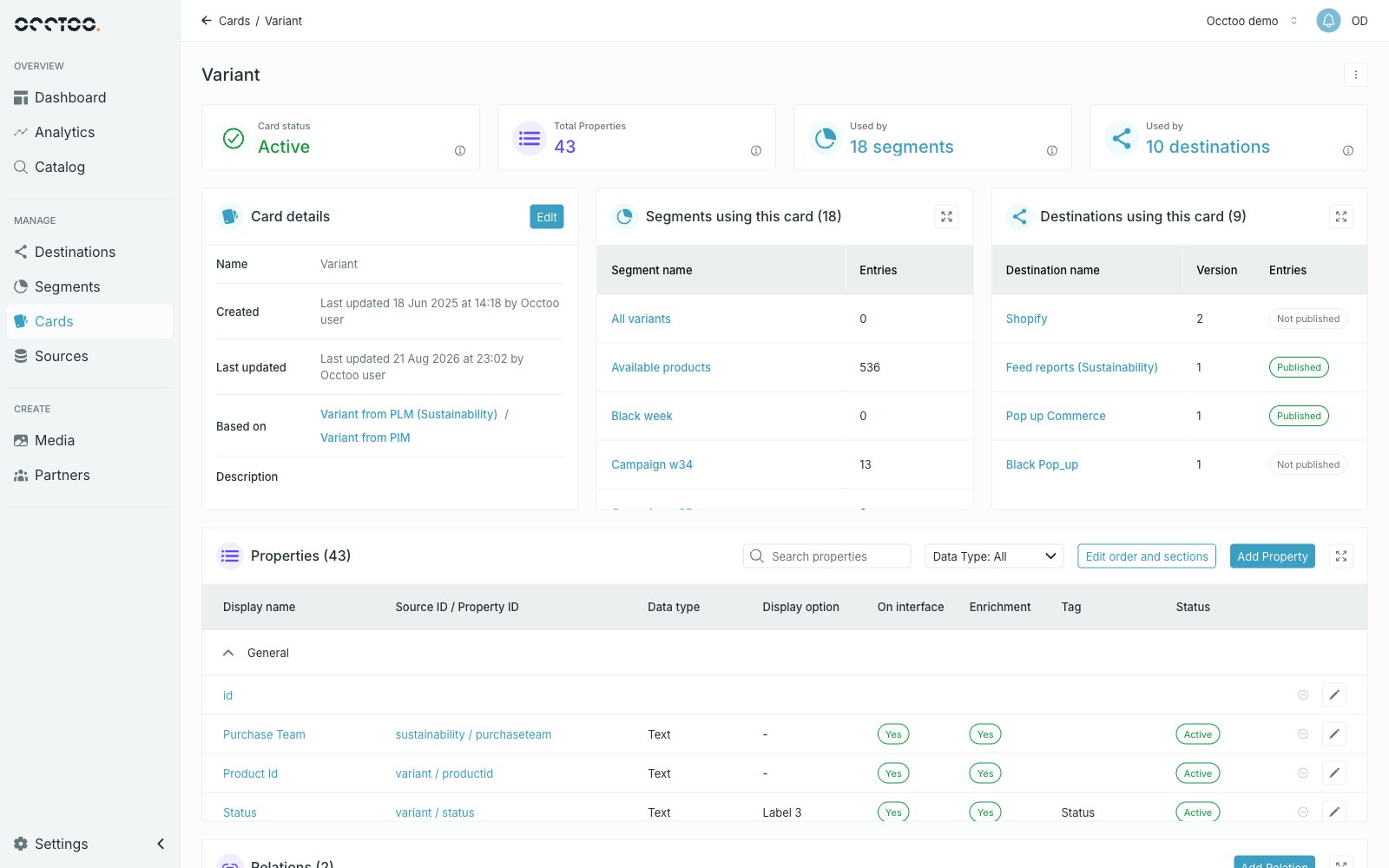
Opening a card from the **Cards** page shows everything about it on one page. There are no tabs — the page scrolls through a header, three summary widgets, the properties table and the relations table.
 ## Header
Four information cards sit under the card name. Each has an info icon explaining what it counts.
* **Card status** — see the status list in [Find cards](/guides/studio/cards/find-cards).
* **Total Properties** — every property on the card.
* **Used by** — how many segments use the card.
* **Used by** — how many destinations use the card.
The buttons in the top right depend on status: **Activate card** on a draft card or one with pending changes, **Restore card** on an archived card, and the menu described below.
## Card details
The **Card details** widget lists **Name**, **Created**, **Last updated**, **Based on** (links to the data sources) and **Description**.
**Edit** opens **Edit card details**, where the name and description can be changed at any time.
## Header
Four information cards sit under the card name. Each has an info icon explaining what it counts.
* **Card status** — see the status list in [Find cards](/guides/studio/cards/find-cards).
* **Total Properties** — every property on the card.
* **Used by** — how many segments use the card.
* **Used by** — how many destinations use the card.
The buttons in the top right depend on status: **Activate card** on a draft card or one with pending changes, **Restore card** on an archived card, and the menu described below.
## Card details
The **Card details** widget lists **Name**, **Created**, **Last updated**, **Based on** (links to the data sources) and **Description**.
**Edit** opens **Edit card details**, where the name and description can be changed at any time.
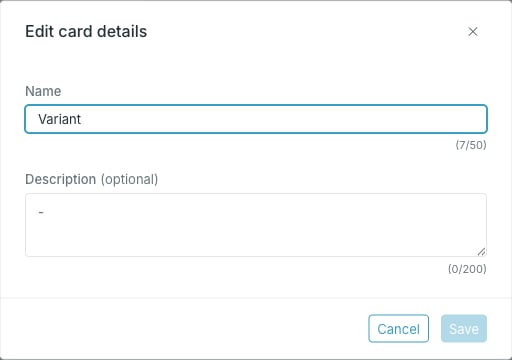 Only the name and description are editable here. The data sources a card is
built on are fixed once the card is created — to base a card on other sources,
[copy the card](/guides/studio/cards/copy-a-card) or create a new one.
## Usage widgets
**Segments using this card** and **Destinations using this card** list where the card's data ends up. See [Track usage of a card](/guides/studio/cards/track-usage).
## Properties and relations
The **Properties** widget holds the property table with its own search, filter and actions — see [Add a property](/guides/studio/cards/add-a-property). The **Relations** widget holds relations to other cards — see [Create a relation between cards](/guides/studio/cards/card-relations).
## Card menu
The menu in the upper right corner holds **Archive card**, **Copy card** and **Delete card**.
Only the name and description are editable here. The data sources a card is
built on are fixed once the card is created — to base a card on other sources,
[copy the card](/guides/studio/cards/copy-a-card) or create a new one.
## Usage widgets
**Segments using this card** and **Destinations using this card** list where the card's data ends up. See [Track usage of a card](/guides/studio/cards/track-usage).
## Properties and relations
The **Properties** widget holds the property table with its own search, filter and actions — see [Add a property](/guides/studio/cards/add-a-property). The **Relations** widget holds relations to other cards — see [Create a relation between cards](/guides/studio/cards/card-relations).
## Card menu
The menu in the upper right corner holds **Archive card**, **Copy card** and **Delete card**.
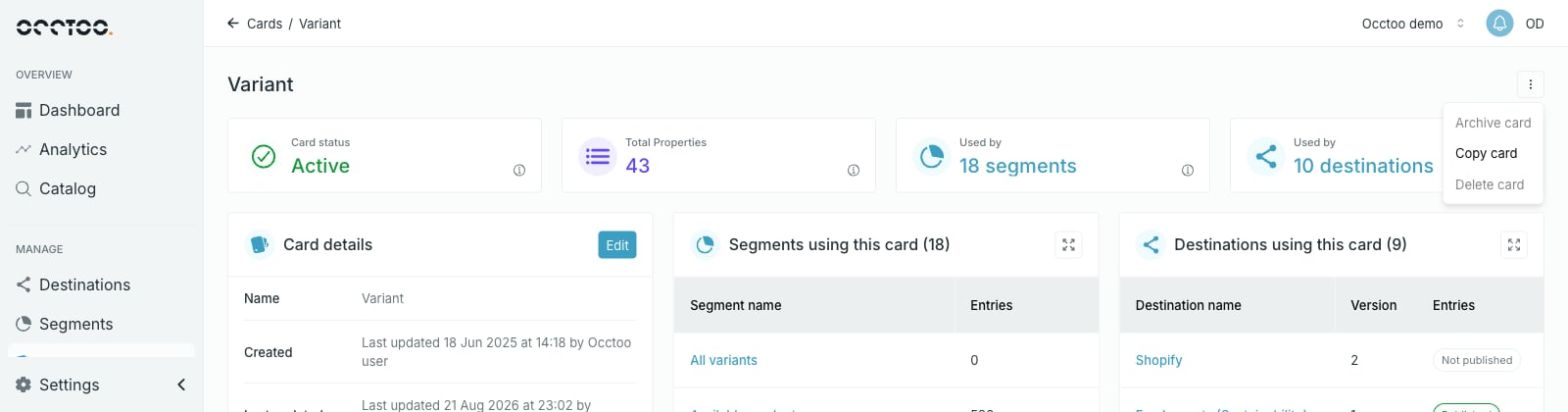 Items are disabled when the action is not possible, and the tooltip says why. On the card above, archive and delete are blocked because the card is used by segments and destinations.
## Who can do what
Anyone can read cards. Creating, editing, activating, archiving, restoring and deleting need the **Contributor** role or higher — a **Reader** sees the same page with those controls disabled. See [Users and roles](/guides/studio/settings/users-and-roles).
Items are disabled when the action is not possible, and the tooltip says why. On the card above, archive and delete are blocked because the card is used by segments and destinations.
## Who can do what
Anyone can read cards. Creating, editing, activating, archiving, restoring and deleting need the **Contributor** role or higher — a **Reader** sees the same page with those controls disabled. See [Users and roles](/guides/studio/settings/users-and-roles).