> ## Documentation Index
> Fetch the complete documentation index at: https://docs.occtoo.com/llms.txt
> Use this file to discover all available pages before exploring further.
# Pending changes
> Review, revert and activate changes made to an active card.
Changes to a **Draft** card apply immediately. Changes to an **Active** card are held as pending changes until you activate the card, so a live destination keeps serving the old shape until you decide otherwise.
The card then has status **Pending Changes** until you activate it.
## Where pending changes are shown
Pending changes are shown in the **Status** column of the properties table, on the rows that changed.
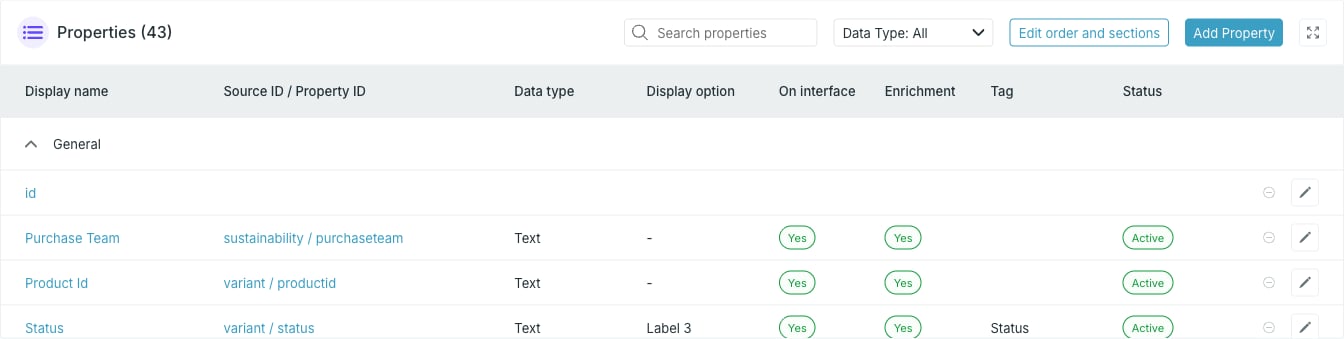 | Status | Meaning |
| ------------------- | ------------------------------------------ |
| **New** | The property was added and is not live yet |
| **Pending changes** | An existing property was edited |
| **Pending delete** | The property is queued for removal |
| **Active** | Live on the card |
**Pending changes** and **Pending delete** mark rows whose edits are not live yet.
On a card that has never been activated, every property is still a pending
addition, so the whole table reads **New** until you press **Activate card**
for the first time. The built-in `id` property has no status of its own and its
cell stays empty.
## Revert one change
A row with a pending edit or a pending removal shows a revert button in place of the edit pencil. Pressing it drops that pending change and leaves the property as it is live.
You can collect as many pending changes as you like before activating, and
revert them one row at a time.
## Activate the changes
Press **Activate card** in the top right of the card page. The card moves to **Updating** while the changes are applied.
While a card is **Updating** you cannot add, edit or remove properties, and
the card cannot be archived, deleted or copied. Wait for the update to finish.
| Status | Meaning |
| ------------------- | ------------------------------------------ |
| **New** | The property was added and is not live yet |
| **Pending changes** | An existing property was edited |
| **Pending delete** | The property is queued for removal |
| **Active** | Live on the card |
**Pending changes** and **Pending delete** mark rows whose edits are not live yet.
On a card that has never been activated, every property is still a pending
addition, so the whole table reads **New** until you press **Activate card**
for the first time. The built-in `id` property has no status of its own and its
cell stays empty.
## Revert one change
A row with a pending edit or a pending removal shows a revert button in place of the edit pencil. Pressing it drops that pending change and leaves the property as it is live.
You can collect as many pending changes as you like before activating, and
revert them one row at a time.
## Activate the changes
Press **Activate card** in the top right of the card page. The card moves to **Updating** while the changes are applied.
While a card is **Updating** you cannot add, edit or remove properties, and
the card cannot be archived, deleted or copied. Wait for the update to finish.