> ## Documentation Index
> Fetch the complete documentation index at: https://docs.occtoo.com/llms.txt
> Use this file to discover all available pages before exploring further.
# Remove a property
> Take a property off a card, and why the action is sometimes blocked.
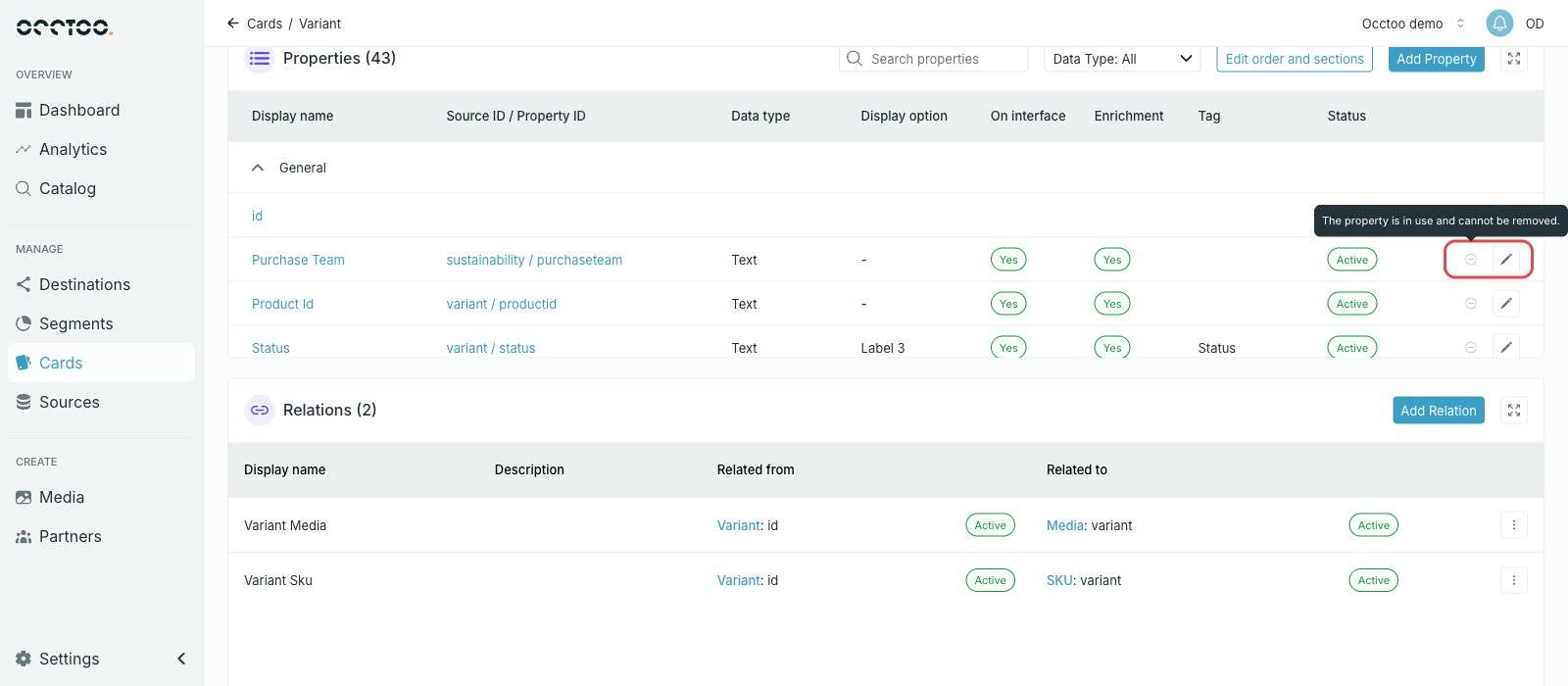
Open the card, find the property in the **Properties** widget and press the minus icon on its row. Confirm with **Yes, remove property**.
## When removal is blocked
The minus icon is disabled when the property is in use.
 A property counts as in use when something downstream reads it — for example a
segment filter or a destination. Remove it there first, then come back to the
card.
## Draft cards versus active cards
* On a **Draft** card the property is taken off immediately.
* On an **Active** card the property stays in the table with status **Pending delete** and is only removed when you press **Activate card**.
While a removal is pending, the row offers a revert button instead of the edit pencil. Pressing it drops the pending removal and leaves the property in place. See [Work with pending changes](/guides/studio/cards/pending-changes).
A property counts as in use when something downstream reads it — for example a
segment filter or a destination. Remove it there first, then come back to the
card.
## Draft cards versus active cards
* On a **Draft** card the property is taken off immediately.
* On an **Active** card the property stays in the table with status **Pending delete** and is only removed when you press **Activate card**.
While a removal is pending, the row offers a revert button instead of the edit pencil. Pressing it drops the pending removal and leaves the property in place. See [Work with pending changes](/guides/studio/cards/pending-changes).