> ## Documentation Index
> Fetch the complete documentation index at: https://docs.occtoo.com/llms.txt
> Use this file to discover all available pages before exploring further.
# Enrich an entry
> Edit property values on a single entry, and revert what you do not want to keep.
Enrichment is editing a value directly on an entry, on top of what the sources delivered. The **Properties** tab of an entry is where that happens.
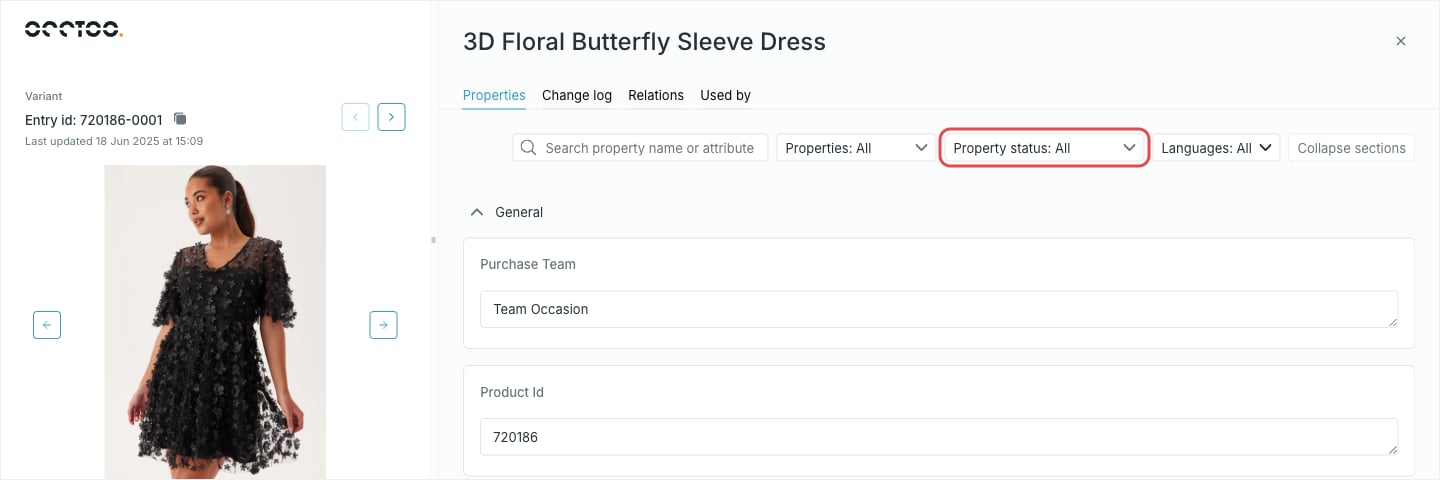 Properties are grouped by the card's display sections, in the card's order. Properties set to not show on the interface are not listed at all.
## Which properties you can edit
A property is editable only when the card has **Allow enrichment** turned on for it. Everything else is rendered read-only, so you can read the sourced value but not type over it. The built-in `id` property is always read-only.
To make a property editable, change it on the card — see [Update a property](/guides/studio/cards/update-a-property).
The input follows the property's data type: a text area for text, a number field for integers and decimals, radio buttons for true/false, a date and time picker for timestamps, and a value picker for list properties. A property bound to a managed tag list offers that list's values instead of free text. Localized text and localized list properties render one input per language.
## Narrow a long property list
| Control | Does |
| ------------------------------------------- | ------------------------------------------------------------------------------------------ |
| **Search property name or attribute** | Matches both property names and the entry's values. Needs more than two characters. |
| **Properties** | Limits the list to one data type. Only the data types this card actually uses are offered. |
| **Property status** | **All**, **Empty**, **Filled** or **Editable** |
| **Languages** | Which languages the localized inputs render. All languages when nothing is picked. |
| **Collapse sections** / **Expand sections** | Folds or unfolds every display section at once |
**Property status** and **Languages** are remembered per card in your browser, so a card you always work on in one language stays that way between visits.
**Editable** is the useful one when a card has hundreds of sourced properties and only a handful you may change.
## Save or revert
The property grows a **Revert changes** button, and a bar appears at the bottom of the entry with **Revert all** and **Save**.
Properties are grouped by the card's display sections, in the card's order. Properties set to not show on the interface are not listed at all.
## Which properties you can edit
A property is editable only when the card has **Allow enrichment** turned on for it. Everything else is rendered read-only, so you can read the sourced value but not type over it. The built-in `id` property is always read-only.
To make a property editable, change it on the card — see [Update a property](/guides/studio/cards/update-a-property).
The input follows the property's data type: a text area for text, a number field for integers and decimals, radio buttons for true/false, a date and time picker for timestamps, and a value picker for list properties. A property bound to a managed tag list offers that list's values instead of free text. Localized text and localized list properties render one input per language.
## Narrow a long property list
| Control | Does |
| ------------------------------------------- | ------------------------------------------------------------------------------------------ |
| **Search property name or attribute** | Matches both property names and the entry's values. Needs more than two characters. |
| **Properties** | Limits the list to one data type. Only the data types this card actually uses are offered. |
| **Property status** | **All**, **Empty**, **Filled** or **Editable** |
| **Languages** | Which languages the localized inputs render. All languages when nothing is picked. |
| **Collapse sections** / **Expand sections** | Folds or unfolds every display section at once |
**Property status** and **Languages** are remembered per card in your browser, so a card you always work on in one language stays that way between visits.
**Editable** is the useful one when a card has hundreds of sourced properties and only a handful you may change.
## Save or revert
The property grows a **Revert changes** button, and a bar appears at the bottom of the entry with **Revert all** and **Save**.
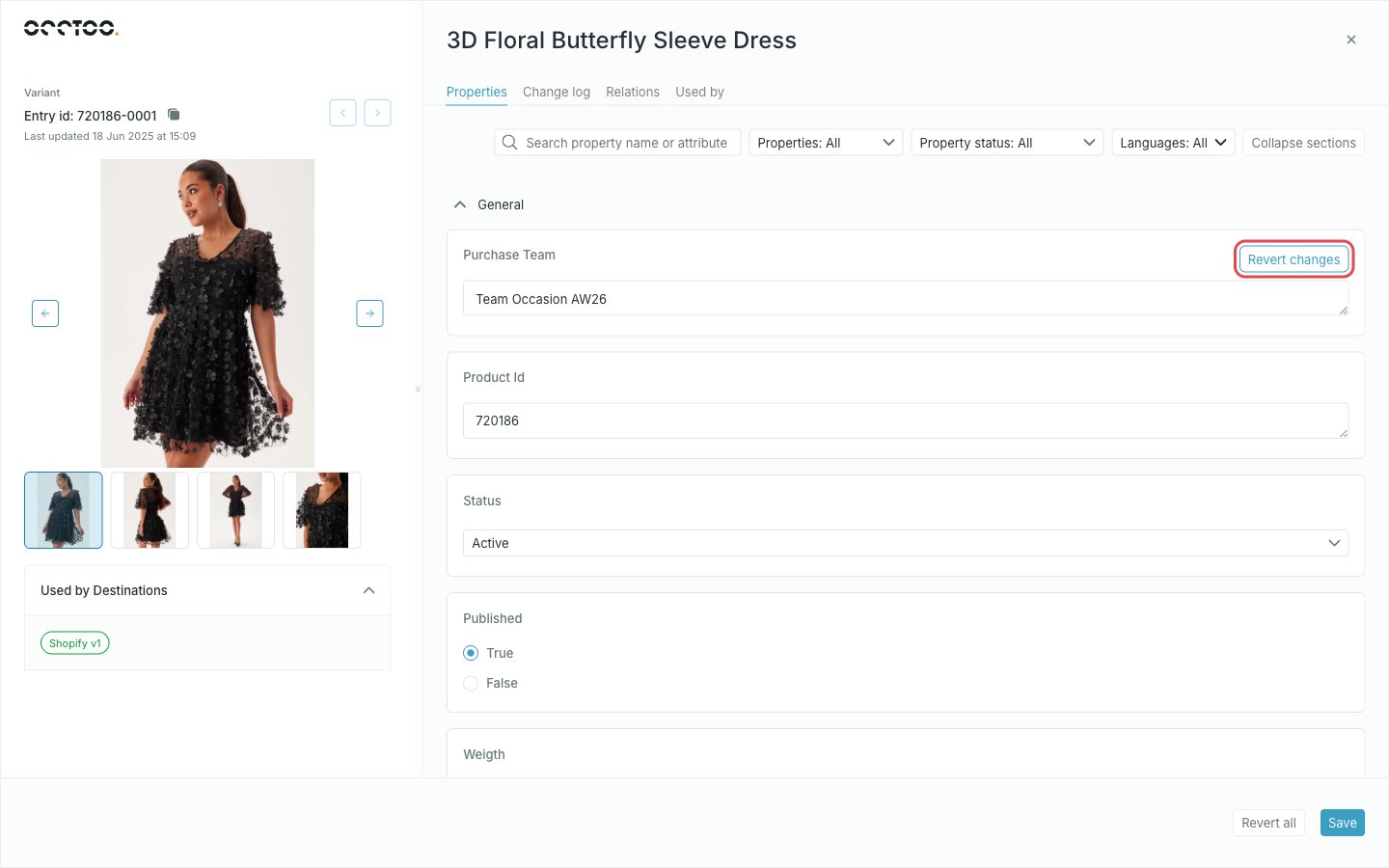 **Revert changes** puts one property back to its stored value. **Revert all** puts back every property you touched.
Only the properties you actually changed are sent. Studio keeps you on the entry, and the entry list and the **Change log** pick the new values up straight away.
While you have unsaved changes the other tabs and the previous/next arrows are disabled. Closing the entry without saving discards the edits.
**Revert changes** puts one property back to its stored value. **Revert all** puts back every property you touched.
Only the properties you actually changed are sent. Studio keeps you on the entry, and the entry list and the **Change log** pick the new values up straight away.
While you have unsaved changes the other tabs and the previous/next arrows are disabled. Closing the entry without saving discards the edits.