> ## Documentation Index
> Fetch the complete documentation index at: https://docs.occtoo.com/llms.txt
> Use this file to discover all available pages before exploring further.
# The entry page
> What the full-screen entry view holds, and how to move between entries.
Selecting an entry title in the list opens the entry full screen. The left side identifies the entry; the right side holds the tabs you work in.
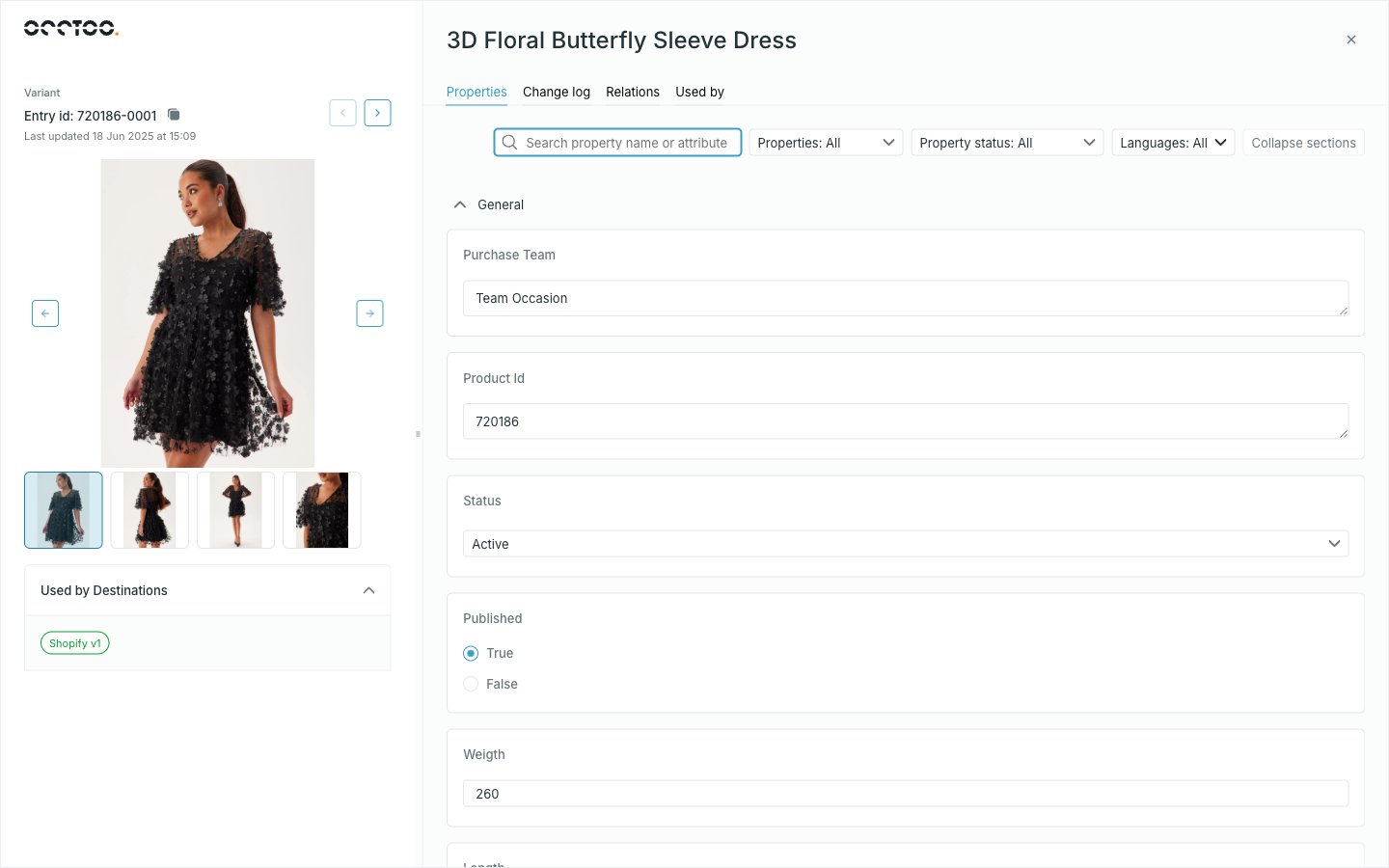 The divider between the two sides can be dragged, and Studio remembers the width per card.
## The left panel
* The card the entry belongs to, and **Entry id** with a copy button.
* When the entry was last updated.
* The image, taken from the card's **Image Preview** or **Image Thumbnail** display option. When the entry has media relations, the image becomes a carousel of them.
* **Used by Destinations** — a badge per destination version that publishes this entry, or a note that it is used in none.
* Arrows to step to the previous and next entry.
The arrows walk the list in the order and filtering you left behind, so a filtered list is also a filtered walk. Reaching the end of the loaded entries loads the next page.
## The tabs
| Tab | Holds |
| -------------- | --------------------------------------------------------------------------------------------------------------------------------------- |
| **Properties** | Every visible property and its value, editable where the card allows it — see [Enrich an entry](/guides/studio/catalog/enrich-an-entry) |
| **Change log** | Who changed what, and when — see [Change log](/guides/studio/catalog/change-log) |
| **Relations** | The entries linked to this one — see [Entry relations](/guides/studio/catalog/entry-relations) |
| **Used by** | The segments and destinations that use this entry — see [Used by](/guides/studio/catalog/used-by) |
The open tab is kept in the URL, so an entry on a particular tab can be linked or reloaded.
## Unsaved changes lock navigation
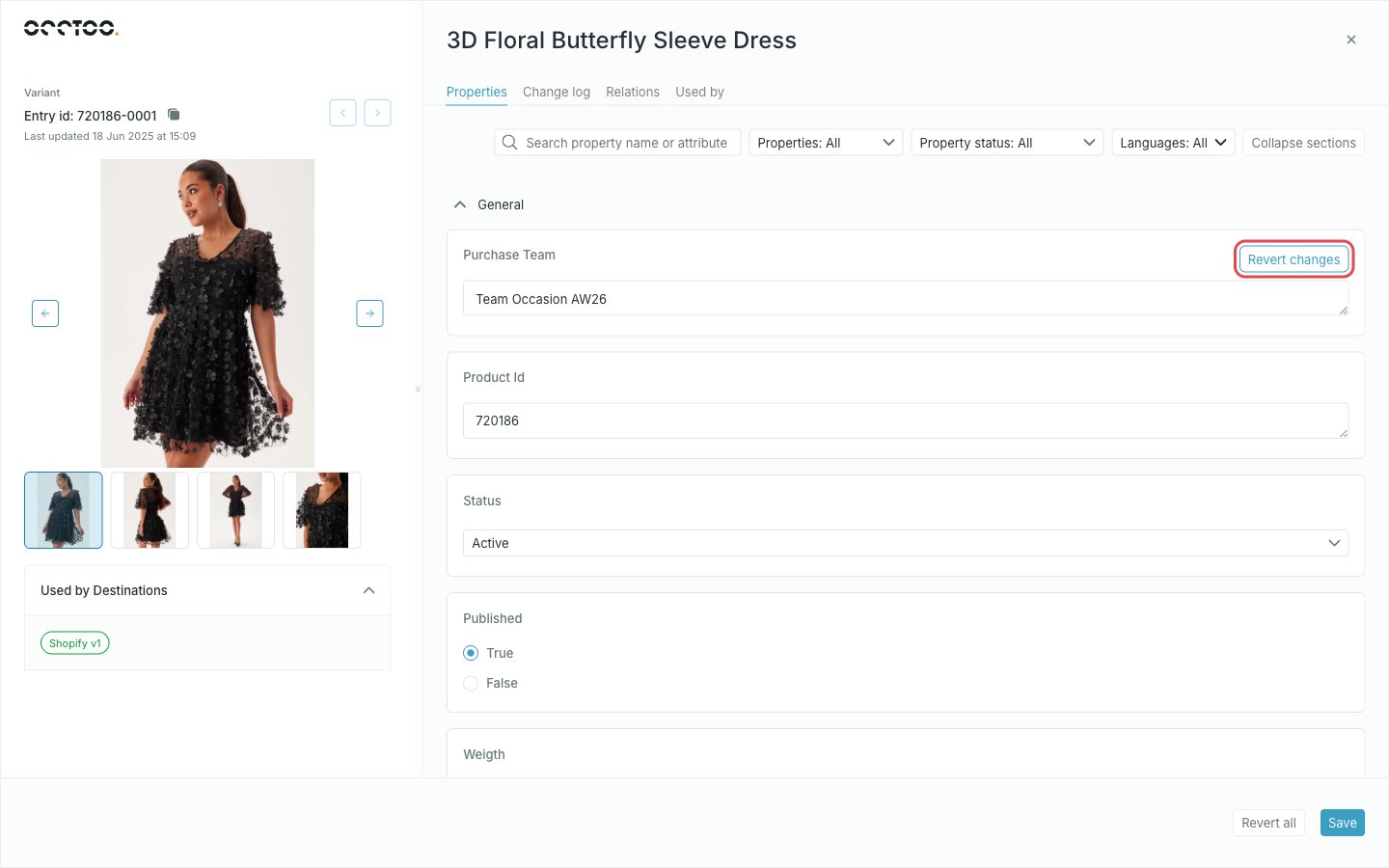
As soon as you edit a value, the other tabs and the previous/next arrows are disabled until you save or revert. Nothing is lost silently — you just cannot leave the **Properties** tab mid-edit.
The divider between the two sides can be dragged, and Studio remembers the width per card.
## The left panel
* The card the entry belongs to, and **Entry id** with a copy button.
* When the entry was last updated.
* The image, taken from the card's **Image Preview** or **Image Thumbnail** display option. When the entry has media relations, the image becomes a carousel of them.
* **Used by Destinations** — a badge per destination version that publishes this entry, or a note that it is used in none.
* Arrows to step to the previous and next entry.
The arrows walk the list in the order and filtering you left behind, so a filtered list is also a filtered walk. Reaching the end of the loaded entries loads the next page.
## The tabs
| Tab | Holds |
| -------------- | --------------------------------------------------------------------------------------------------------------------------------------- |
| **Properties** | Every visible property and its value, editable where the card allows it — see [Enrich an entry](/guides/studio/catalog/enrich-an-entry) |
| **Change log** | Who changed what, and when — see [Change log](/guides/studio/catalog/change-log) |
| **Relations** | The entries linked to this one — see [Entry relations](/guides/studio/catalog/entry-relations) |
| **Used by** | The segments and destinations that use this entry — see [Used by](/guides/studio/catalog/used-by) |
The open tab is kept in the URL, so an entry on a particular tab can be linked or reloaded.
## Unsaved changes lock navigation
As soon as you edit a value, the other tabs and the previous/next arrows are disabled until you save or revert. Nothing is lost silently — you just cannot leave the **Properties** tab mid-edit.
 ## Leaving the entry
The cross at the top right closes the entry and returns to the list, with your search, sort, filters and selection intact.
## Leaving the entry
The cross at the top right closes the entry and returns to the list, with your search, sort, filters and selection intact.