> ## Documentation Index
> Fetch the complete documentation index at: https://docs.occtoo.com/llms.txt
> Use this file to discover all available pages before exploring further.
# Star a block as a favorite
> Pin the sources, cards, segments and destinations you open most often to the Dashboard.
Favorites are per user and per environment. Starring a card in one environment does not star it in another, and your colleagues keep their own list.
## Star a block
Go to **Sources**, **Cards**, **Segments** or **Destinations**.
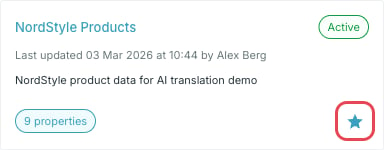
Every tile carries a star in its lower-right corner. Click it to add the block to your favorites; click it again to remove it.
 ## Where they appear
Starred blocks show up under **Favorites** on the [Dashboard](/guides/studio/dashboard/overview), as the same tiles you see in the listings — status, last update, and the block's own counters.
## Where they appear
Starred blocks show up under **Favorites** on the [Dashboard](/guides/studio/dashboard/overview), as the same tiles you see in the listings — status, last update, and the block's own counters.
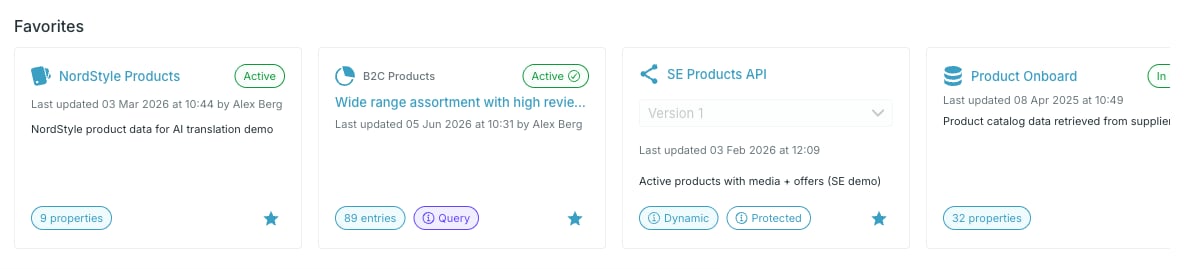 The strip scrolls sideways when you have more favorites than fit, and mixes block types in one row. Until you star something it shows an empty state instead.
A destination tile carries its version selector. Favoriting a destination stars one specific API version, so a destination with two versions can appear twice.
The strip scrolls sideways when you have more favorites than fit, and mixes block types in one row. Until you star something it shows an empty state instead.
A destination tile carries its version selector. Favoriting a destination stars one specific API version, so a destination with two versions can appear twice.