> ## Documentation Index
> Fetch the complete documentation index at: https://docs.occtoo.com/llms.txt
> Use this file to discover all available pages before exploring further.
# Switch environment
> Move between the Occtoo environments you have access to, and find the safe name and tenant ID an integration needs.
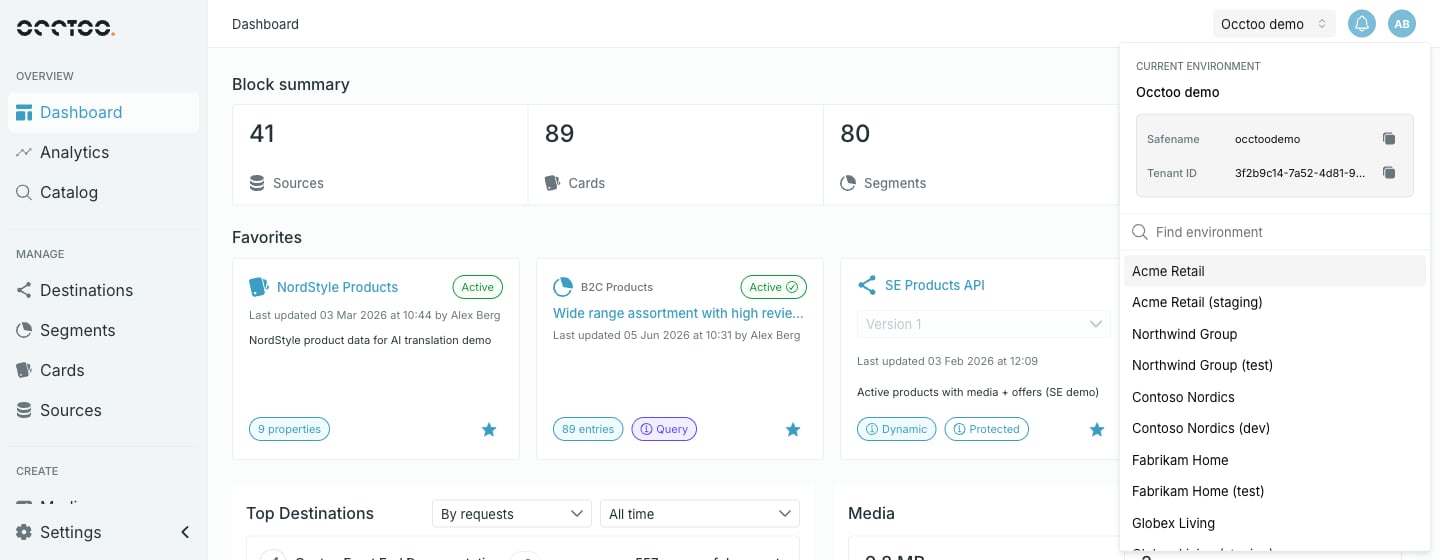
The environment you are working in is named in the top bar, to the left of the notification bell. Clicking it opens a panel that both identifies the current environment and lets you move to another one.
 ## Identify the current environment
Under **Current environment** the panel shows the display name, and two values integrations need, each with a copy control:
| Value | Used for |
| ------------- | ------------------------------------------------------------------------------------------------------------ |
| **Safename** | The environment segment of every destination URL — `https://global.occtoo.com/{safename}/{destination}/v{n}` |
| **Tenant ID** | Identifying the environment when calling the ingest and consumption APIs |
## Move to another environment
Environments you belong to are listed below the divider, sorted alphabetically. Select one to switch.
Switching environment reloads Studio and returns you to the Dashboard. Anything unsaved on the page you were on is lost — save first.
The list carries a **Find environment** search box once you belong to more than five environments. Below that number the panel just lists them.
If you belong to a single environment the panel shows only the details block — there is nothing to switch to. Access is granted per environment; ask an **Administrator** of the environment you need. See [Users and roles](/guides/studio/settings/users-and-roles).
Your role can differ per environment. Being a Contributor in one does not make you a Contributor in the next, so controls that were enabled a moment ago may be disabled after switching.
## Identify the current environment
Under **Current environment** the panel shows the display name, and two values integrations need, each with a copy control:
| Value | Used for |
| ------------- | ------------------------------------------------------------------------------------------------------------ |
| **Safename** | The environment segment of every destination URL — `https://global.occtoo.com/{safename}/{destination}/v{n}` |
| **Tenant ID** | Identifying the environment when calling the ingest and consumption APIs |
## Move to another environment
Environments you belong to are listed below the divider, sorted alphabetically. Select one to switch.
Switching environment reloads Studio and returns you to the Dashboard. Anything unsaved on the page you were on is lost — save first.
The list carries a **Find environment** search box once you belong to more than five environments. Below that number the panel just lists them.
If you belong to a single environment the panel shows only the details block — there is nothing to switch to. Access is granted per environment; ask an **Administrator** of the environment you need. See [Users and roles](/guides/studio/settings/users-and-roles).
Your role can differ per environment. Being a Contributor in one does not make you a Contributor in the next, so controls that were enabled a moment ago may be disabled after switching.