> ## Documentation Index
> Fetch the complete documentation index at: https://docs.occtoo.com/llms.txt
> Use this file to discover all available pages before exploring further.
# Manage languages
> Map the language keys in your onboarded data to the language codes the API exposes.
Localized properties are stored per language key. The **Languages** tab decides which of those keys this version serves, and what each is called on the API.
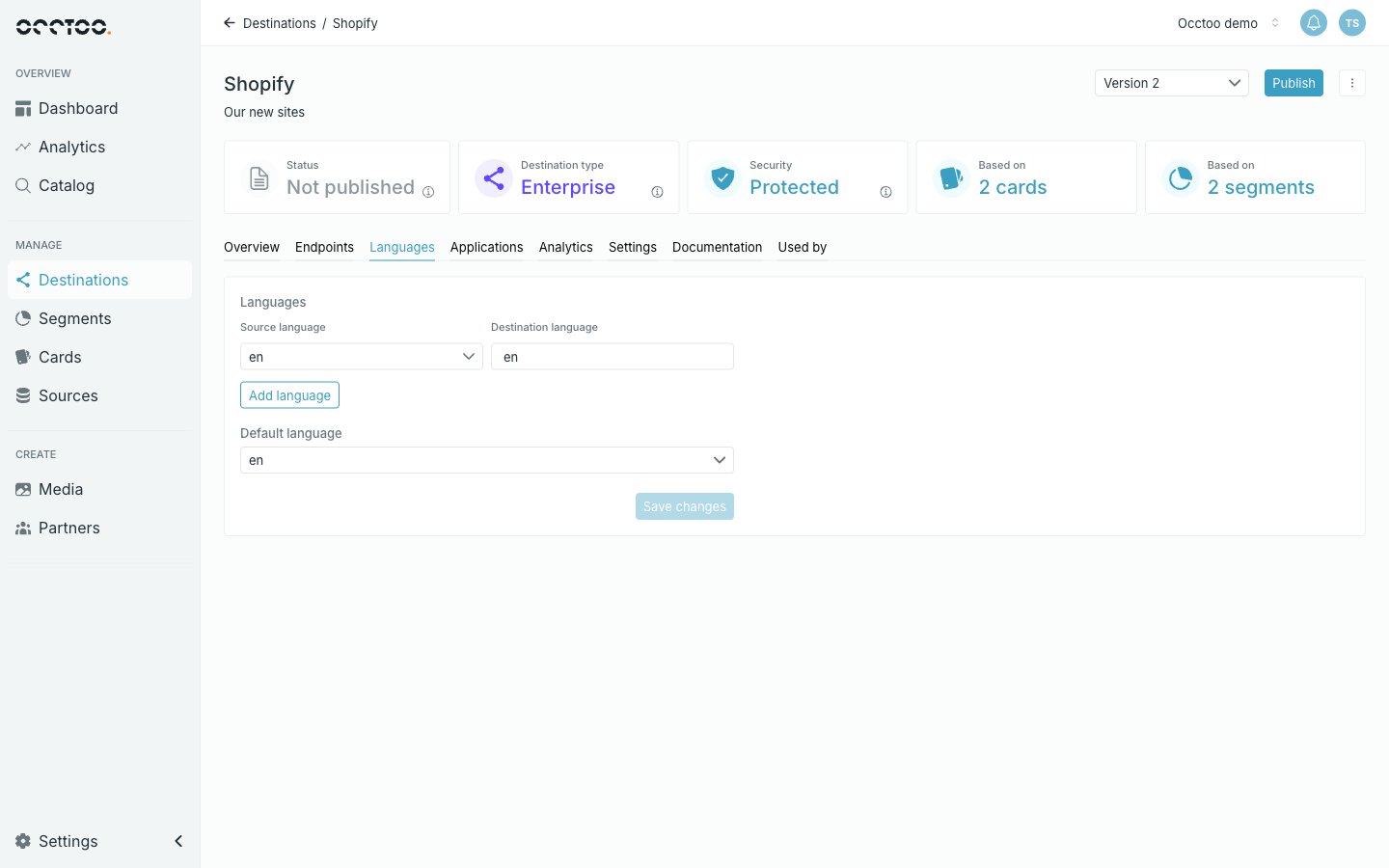 Each row is one mapping:
* **Source language** — a language key that exists in your onboarded data. The selector lists the keys Occtoo has seen.
* **Destination language** — the code callers use, for example in `&language=no`.
The two need not match. Data onboarded under `sv-SE` can be served as `sv`.
## Add or remove a language
Use **Add language** for a new row, and the bin icon to drop one. Then pick the **Default language** — the language served when a request does not ask for one — and click **Save changes**.
Keys and values must be 2–10 characters, may contain only letters, digits, `_` and `-`, and must each be unique within the version. The **Default language** selector only offers rows that are completely and validly filled in, and follows along if you delete the row it was pointing at.
Languages can only be changed while the version is **Not published**. Once published, the whole tab is read-only — a language added later would change the shape of every localized field. Create a new version to add one. See [Create a version](/guides/studio/destinations/create-a-version).
Add every language you intend to query before publishing. A localized property can only be requested for a language the destination carries; asking for one it does not know returns the default language instead of an error.
Facet headers are entered per language, so adding a language means every faceted property needs a header for it — see [Endpoint content](/guides/studio/destinations/endpoint-content).
Each row is one mapping:
* **Source language** — a language key that exists in your onboarded data. The selector lists the keys Occtoo has seen.
* **Destination language** — the code callers use, for example in `&language=no`.
The two need not match. Data onboarded under `sv-SE` can be served as `sv`.
## Add or remove a language
Use **Add language** for a new row, and the bin icon to drop one. Then pick the **Default language** — the language served when a request does not ask for one — and click **Save changes**.
Keys and values must be 2–10 characters, may contain only letters, digits, `_` and `-`, and must each be unique within the version. The **Default language** selector only offers rows that are completely and validly filled in, and follows along if you delete the row it was pointing at.
Languages can only be changed while the version is **Not published**. Once published, the whole tab is read-only — a language added later would change the shape of every localized field. Create a new version to add one. See [Create a version](/guides/studio/destinations/create-a-version).
Add every language you intend to query before publishing. A localized property can only be requested for a language the destination carries; asking for one it does not know returns the default language instead of an error.
Facet headers are entered per language, so adding a language means every faceted property needs a header for it — see [Endpoint content](/guides/studio/destinations/endpoint-content).