> ## Documentation Index
> Fetch the complete documentation index at: https://docs.occtoo.com/llms.txt
> Use this file to discover all available pages before exploring further.
# Endpoint details
> Choose which properties an endpoint exposes, rename them for the API, and turn them into facets.
Opening an endpoint shows two panes side by side. On the left, a tree of everything the endpoint could expose. On the right, a live preview of the JSON a caller will get back — it updates as you tick and untick.
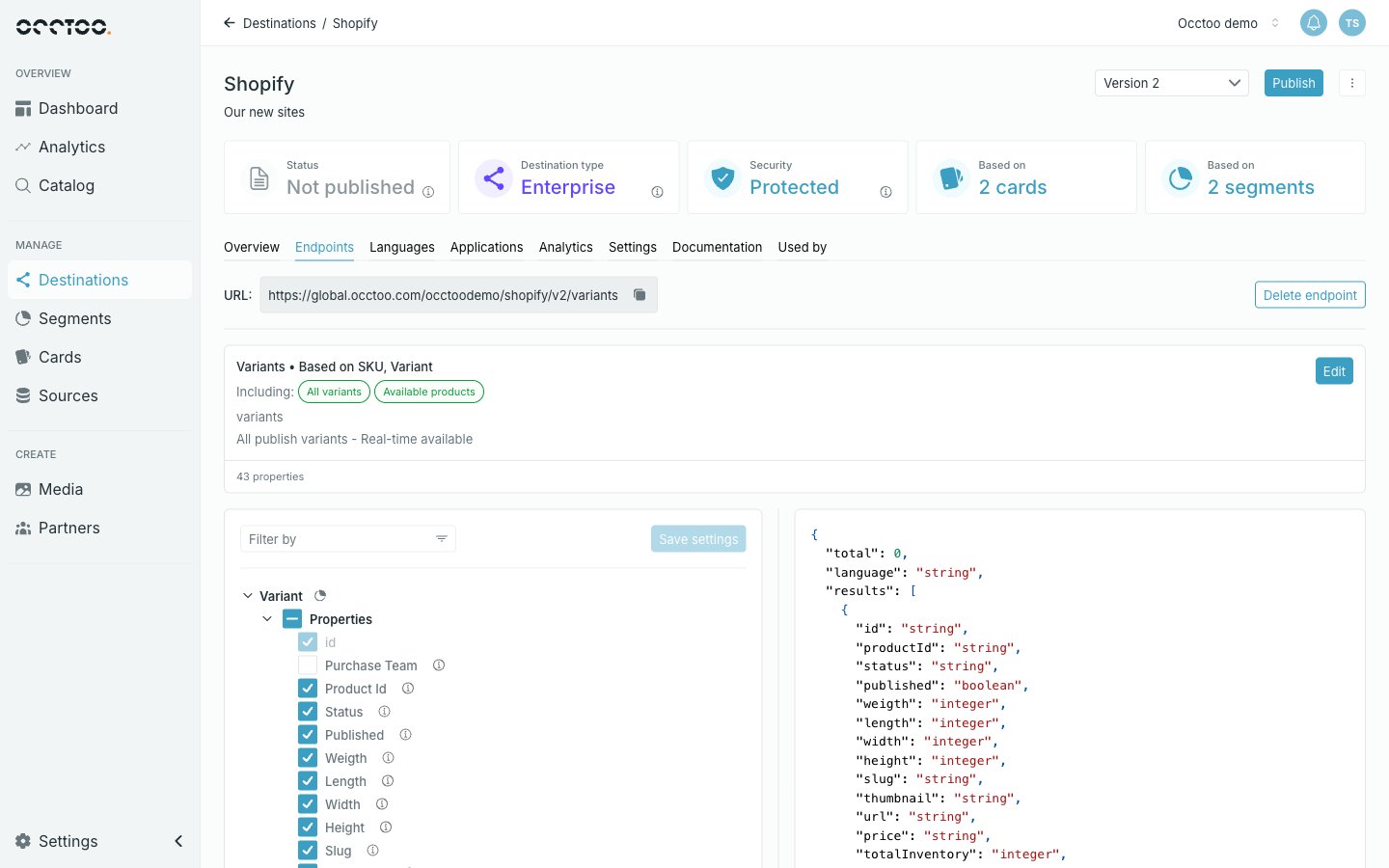 Above the tree sit **Filter by** and **Save settings**. Above both panes, the endpoint's **URL** with a copy control, **Delete endpoint**, and a summary card with an **Edit** control for the endpoint's name and description.
## The tree
The root node is the card the endpoint is based on. Under it:
* **Properties** — every property of that card, each with a checkbox.
* **Relations** — related cards you have added, each its own node with its own Properties and Relations. See [Endpoint relations](/guides/studio/destinations/endpoint-relations).
The checkbox on the **Properties** group selects or clears the whole group at once, and shows a mixed state when only some are ticked.
Two icons can appear after a property: one marks that it carries an alias, one that it is a facet. Both have tooltips naming the value.
## Select properties
Tick a property to include it in the response; untick it to leave it out. Some checkboxes are disabled, and the tooltip says why:
| Disabled because | What to do |
| ---------------------------------------- | --------------------------------------------------------------- |
| It is the entry `id` of the root card | Nothing — `id` is always returned |
| It orders a relation | Change or clear the relation's **Order by property** first |
| It has pending modifications on the card | Publish the card change first |
| The version is publishing or updating | Wait for the run to finish |
| The property is already published | Add it in a new version; published properties cannot be removed |
Click **Save settings** when you are done. The button stays disabled until something changes.
Leaving the endpoint with unsaved changes prompts you to confirm, and answering **Yes, cancel** discards them. Starting a publish with unsaved changes also discards them — Studio asks first.
## Narrow a long tree
**Filter by** limits the tree to properties matching one or more of:
| Filter | Shows |
| ------------------- | --------------------------------------- |
| **Selected** | Properties that are ticked |
| **Alias** | Properties that carry an alias |
| **Facet** | Properties with faceting enabled |
| **Pending content** | Properties added since the last publish |
## Rename a property for the API
The info icon on a property row opens **Property details**. The top of the dialog is a read-only summary — card definition id, name, identifier, current alias, data type, and the facet settings. Below it are the editable fields.
Above the tree sit **Filter by** and **Save settings**. Above both panes, the endpoint's **URL** with a copy control, **Delete endpoint**, and a summary card with an **Edit** control for the endpoint's name and description.
## The tree
The root node is the card the endpoint is based on. Under it:
* **Properties** — every property of that card, each with a checkbox.
* **Relations** — related cards you have added, each its own node with its own Properties and Relations. See [Endpoint relations](/guides/studio/destinations/endpoint-relations).
The checkbox on the **Properties** group selects or clears the whole group at once, and shows a mixed state when only some are ticked.
Two icons can appear after a property: one marks that it carries an alias, one that it is a facet. Both have tooltips naming the value.
## Select properties
Tick a property to include it in the response; untick it to leave it out. Some checkboxes are disabled, and the tooltip says why:
| Disabled because | What to do |
| ---------------------------------------- | --------------------------------------------------------------- |
| It is the entry `id` of the root card | Nothing — `id` is always returned |
| It orders a relation | Change or clear the relation's **Order by property** first |
| It has pending modifications on the card | Publish the card change first |
| The version is publishing or updating | Wait for the run to finish |
| The property is already published | Add it in a new version; published properties cannot be removed |
Click **Save settings** when you are done. The button stays disabled until something changes.
Leaving the endpoint with unsaved changes prompts you to confirm, and answering **Yes, cancel** discards them. Starting a publish with unsaved changes also discards them — Studio asks first.
## Narrow a long tree
**Filter by** limits the tree to properties matching one or more of:
| Filter | Shows |
| ------------------- | --------------------------------------- |
| **Selected** | Properties that are ticked |
| **Alias** | Properties that carry an alias |
| **Facet** | Properties with faceting enabled |
| **Pending content** | Properties added since the last publish |
## Rename a property for the API
The info icon on a property row opens **Property details**. The top of the dialog is a read-only summary — card definition id, name, identifier, current alias, data type, and the facet settings. Below it are the editable fields.
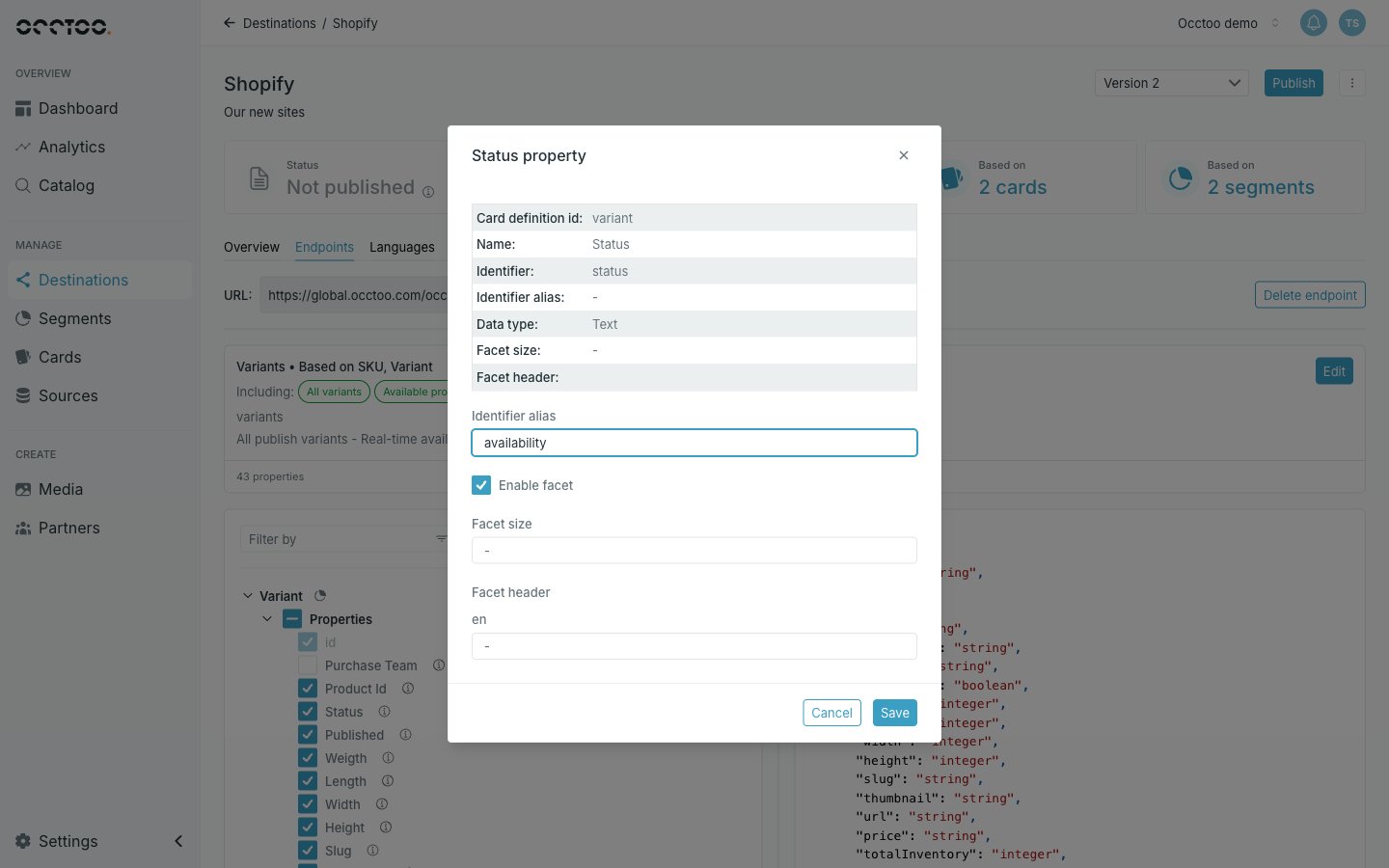 **Identifier alias** replaces the property's identifier in the API response, so an internal `prodStatusCode` can be served as `status`. Leave it empty to serve the identifier as-is.
An alias must start with a lowercase letter and contain only letters, digits and underscores, and must be unique among the aliases of its sibling properties.
An alias cannot be changed once the property has been published — renaming a field would break every consumer already reading it. The field is disabled in that case; expose the new name in a new version instead.
## Turn a property into a facet
Facets return counts per value alongside the results, so a caller can build filters — "37 items in blue, 12 in red" — without a second query.
In **Property details**, tick **Enable facet**. Two fields become available:
* **Facet size** — how many distinct values are returned for this facet, 1 to 999.
* **Facet header** — the label for the facet, one field per language on the destination. All of them are required once faceting is on.
Click **Save** in the dialog, then **Save settings** on the tree.
Every facet is computed on each request. A handful is fine; enabling facets on many properties, or setting a large facet size, will slow the endpoint down.
Facets can be added to a published version without creating a new one — see [Pending changes](/guides/studio/destinations/pending-changes).
**Identifier alias** replaces the property's identifier in the API response, so an internal `prodStatusCode` can be served as `status`. Leave it empty to serve the identifier as-is.
An alias must start with a lowercase letter and contain only letters, digits and underscores, and must be unique among the aliases of its sibling properties.
An alias cannot be changed once the property has been published — renaming a field would break every consumer already reading it. The field is disabled in that case; expose the new name in a new version instead.
## Turn a property into a facet
Facets return counts per value alongside the results, so a caller can build filters — "37 items in blue, 12 in red" — without a second query.
In **Property details**, tick **Enable facet**. Two fields become available:
* **Facet size** — how many distinct values are returned for this facet, 1 to 999.
* **Facet header** — the label for the facet, one field per language on the destination. All of them are required once faceting is on.
Click **Save** in the dialog, then **Save settings** on the tree.
Every facet is computed on each request. A handful is fine; enabling facets on many properties, or setting a large facet size, will slow the endpoint down.
Facets can be added to a published version without creating a new one — see [Pending changes](/guides/studio/destinations/pending-changes).