> ## Documentation Index
> Fetch the complete documentation index at: https://docs.occtoo.com/llms.txt
> Use this file to discover all available pages before exploring further.
# Create a subscription
> Pick a delivery type, point it at your endpoint or queue, and choose the events it receives.
One dialog creates the subscription: the delivery type first, then the target it writes to, then the event filter.
On the listing, click **New subscription**.
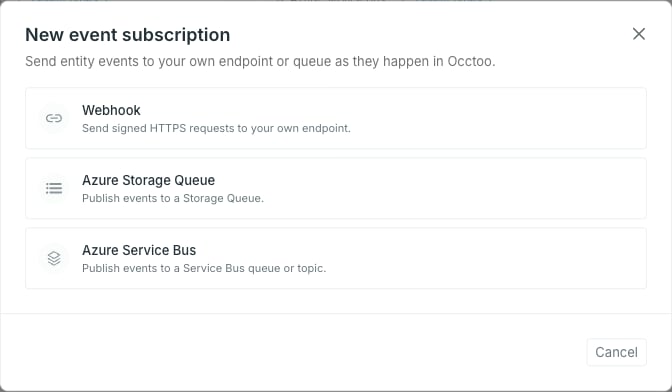 The type decides which target fields the rest of the dialog asks for, and it is fixed once the subscription exists — editing a subscription later cannot turn a queue into a webhook.
**Back** returns to this list and rebuilds the form from scratch. Everything typed into it, including the event filter, is discarded.
The **Name** is yours — it identifies the subscription in Studio and nothing else.
**Webhook**
The type decides which target fields the rest of the dialog asks for, and it is fixed once the subscription exists — editing a subscription later cannot turn a queue into a webhook.
**Back** returns to this list and rebuilds the form from scratch. Everything typed into it, including the event filter, is discarded.
The **Name** is yours — it identifies the subscription in Studio and nothing else.
**Webhook**
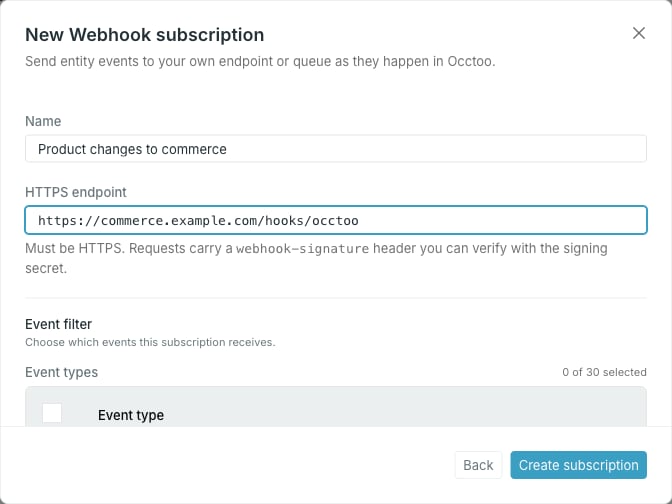 The **HTTPS endpoint** must start with `https://`. Every event delivery request carries a `webhook-signature` header you verify with the signing secret — see [Signing secrets](/guides/studio/events/signing-secrets).
**Azure Storage Queue and Azure Service Bus**
The **HTTPS endpoint** must start with `https://`. Every event delivery request carries a `webhook-signature` header you verify with the signing secret — see [Signing secrets](/guides/studio/events/signing-secrets).
**Azure Storage Queue and Azure Service Bus**
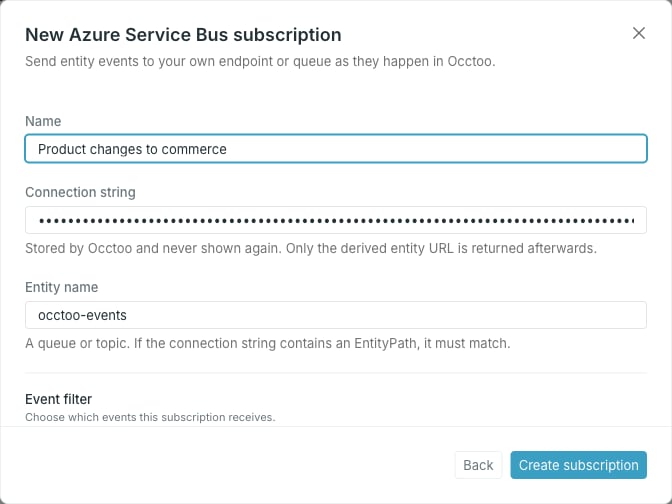 | Field | What to enter |
| ------------------------------ | ---------------------------------------------------------------------- |
| **Connection string** | The connection string for the storage account or Service Bus namespace |
| **Queue name** (Storage Queue) | The queue that receives the events |
| **Entity name** (Service Bus) | The queue or topic that receives the events |
The connection string is stored by Occtoo and never shown again — afterwards only the derived queue or entity URL comes back. If the connection string carries an `EntityPath=`, it has to name the same entity you typed, and the dialog blocks the mismatch before it reaches the API.
Pick at least one event type, and optionally narrow it with conditions. See [Build the event filter](/guides/studio/events/event-filter).
Click **Create subscription**.
A **Webhook** shows its signing secret once, then opens in **Pending verification** — no events are delivered until the endpoint is verified. A queue subscription has no secret and no verification step: Studio opens it straight away.
A subscription only receives events published after it starts delivering. Nothing from before that point is replayed, so a consumer that needs history has to read it from the [Events API](/api-reference/events/overview) instead.
| Field | What to enter |
| ------------------------------ | ---------------------------------------------------------------------- |
| **Connection string** | The connection string for the storage account or Service Bus namespace |
| **Queue name** (Storage Queue) | The queue that receives the events |
| **Entity name** (Service Bus) | The queue or topic that receives the events |
The connection string is stored by Occtoo and never shown again — afterwards only the derived queue or entity URL comes back. If the connection string carries an `EntityPath=`, it has to name the same entity you typed, and the dialog blocks the mismatch before it reaches the API.
Pick at least one event type, and optionally narrow it with conditions. See [Build the event filter](/guides/studio/events/event-filter).
Click **Create subscription**.
A **Webhook** shows its signing secret once, then opens in **Pending verification** — no events are delivered until the endpoint is verified. A queue subscription has no secret and no verification step: Studio opens it straight away.
A subscription only receives events published after it starts delivering. Nothing from before that point is replayed, so a consumer that needs history has to read it from the [Events API](/api-reference/events/overview) instead.