> ## Documentation Index
> Fetch the complete documentation index at: https://docs.occtoo.com/llms.txt
> Use this file to discover all available pages before exploring further.
# Find event subscriptions
> Browse the event subscriptions in the environment, filter them by type and status, and see what each tile tells you.
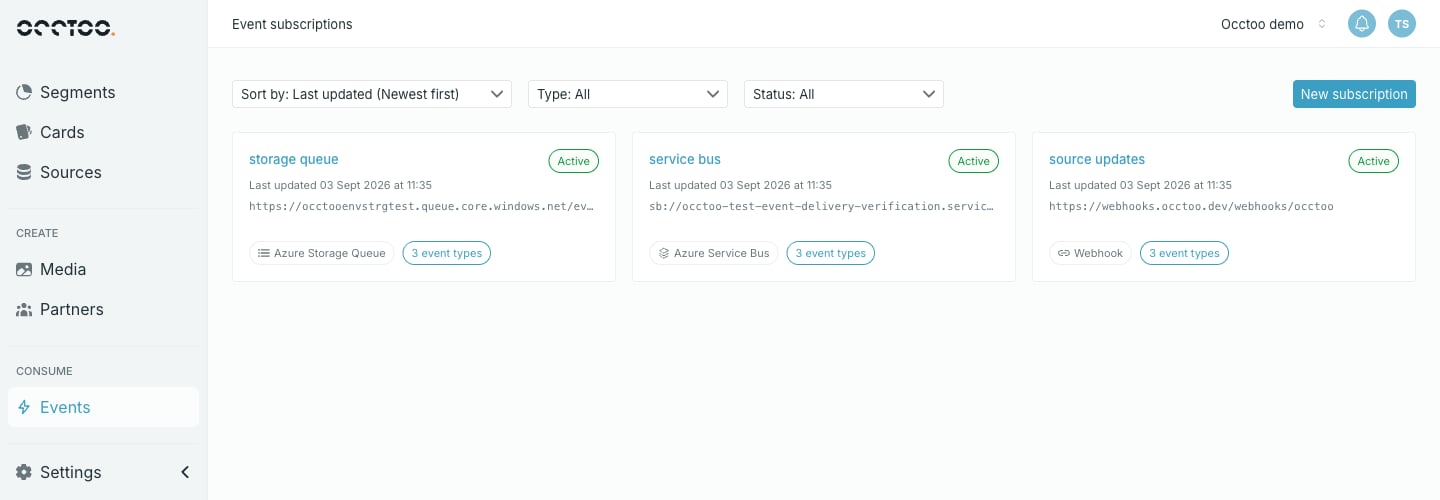
An **event subscription** tells Occtoo to push events somewhere as they happen — to your own HTTPS endpoint, an Azure Storage Queue, or an Azure Service Bus queue or topic. Each subscription pairs one delivery target with one **event filter** that decides which of the 30 event types it receives.
Open them from **Consume → Events** in the sidebar.
 Subscriptions push events to you. To pull the same events yourself, or to read them as a live stream, use the [Events API](/api-reference/events/overview).
## Subscription types
| Type | Delivers to | Target shown on the tile |
| ----------------------- | ------------------------------------------- | ------------------------ |
| **Webhook** | Your own HTTPS endpoint, as signed requests | Endpoint URL |
| **Azure Storage Queue** | A Storage Queue | Queue URL |
| **Azure Service Bus** | A Service Bus queue or topic | Service Bus entity URI |
## Filter and sort
| Control | Options |
| ----------- | ------------------------------------------------------------ |
| **Sort by** | Last updated — newest or oldest first |
| **Type** | All, Webhook, Azure Storage Queue, Azure Service Bus |
| **Status** | All, Active, Pending verification, Paused, Disabled, Deleted |
The listing loads 25 subscriptions at a time and **Load more** fetches the next 25. Sorting reorders the subscriptions already loaded, so load the rest before reading the oldest-first order as complete.
## What a tile shows
The name, the current status, when the subscription was last updated, the delivery target, the subscription type, and how many event types the filter covers.
The event-type count is the number of types named in the filter. A filter that names none covers all 30, and the tile says so.
## Statuses
| Status | Meaning |
| ------------------------ | ------------------------------------------------------------------------------------------------------------------------------------------------------------------------------ |
| **Active** | Delivering matching events |
| **Pending verification** | A webhook whose endpoint has not completed verification. Nothing is delivered until verification succeeds — see [Verify an endpoint](/guides/studio/events/verify-an-endpoint) |
| **Paused** | Delivery was paused by a user or automatically after repeated authorization failures. **Resume** starts again from the current event head |
| **Disabled** | Delivery is switched off. Studio offers no **Pause** or **Resume** control in this state |
| **Deleted** | Deleted. Kept only so it can still be found by filtering on this status |
## Who can do what
Anyone with access to Studio can browse subscriptions, open one and read its deliveries.
Creating, editing, pausing, resuming, rotating a signing secret and deleting all need the **Contributor** role or higher. A **Reader** sees the same screens with those controls disabled.
See [Users and roles](/guides/studio/settings/users-and-roles).
Subscriptions push events to you. To pull the same events yourself, or to read them as a live stream, use the [Events API](/api-reference/events/overview).
## Subscription types
| Type | Delivers to | Target shown on the tile |
| ----------------------- | ------------------------------------------- | ------------------------ |
| **Webhook** | Your own HTTPS endpoint, as signed requests | Endpoint URL |
| **Azure Storage Queue** | A Storage Queue | Queue URL |
| **Azure Service Bus** | A Service Bus queue or topic | Service Bus entity URI |
## Filter and sort
| Control | Options |
| ----------- | ------------------------------------------------------------ |
| **Sort by** | Last updated — newest or oldest first |
| **Type** | All, Webhook, Azure Storage Queue, Azure Service Bus |
| **Status** | All, Active, Pending verification, Paused, Disabled, Deleted |
The listing loads 25 subscriptions at a time and **Load more** fetches the next 25. Sorting reorders the subscriptions already loaded, so load the rest before reading the oldest-first order as complete.
## What a tile shows
The name, the current status, when the subscription was last updated, the delivery target, the subscription type, and how many event types the filter covers.
The event-type count is the number of types named in the filter. A filter that names none covers all 30, and the tile says so.
## Statuses
| Status | Meaning |
| ------------------------ | ------------------------------------------------------------------------------------------------------------------------------------------------------------------------------ |
| **Active** | Delivering matching events |
| **Pending verification** | A webhook whose endpoint has not completed verification. Nothing is delivered until verification succeeds — see [Verify an endpoint](/guides/studio/events/verify-an-endpoint) |
| **Paused** | Delivery was paused by a user or automatically after repeated authorization failures. **Resume** starts again from the current event head |
| **Disabled** | Delivery is switched off. Studio offers no **Pause** or **Resume** control in this state |
| **Deleted** | Deleted. Kept only so it can still be found by filtering on this status |
## Who can do what
Anyone with access to Studio can browse subscriptions, open one and read its deliveries.
Creating, editing, pausing, resuming, rotating a signing secret and deleting all need the **Contributor** role or higher. A **Reader** sees the same screens with those controls disabled.
See [Users and roles](/guides/studio/settings/users-and-roles).