> ## Documentation Index
> Fetch the complete documentation index at: https://docs.occtoo.com/llms.txt
> Use this file to discover all available pages before exploring further.
# Monitor deliveries
> Read the delivery chart and delivery history on a subscription, and understand what each status means.
Two widgets on the subscription page cover delivery: the chart summarises final delivery outcomes over a time range, and the table shows one row per delivery with its current status and attempt count.
## Deliveries over time
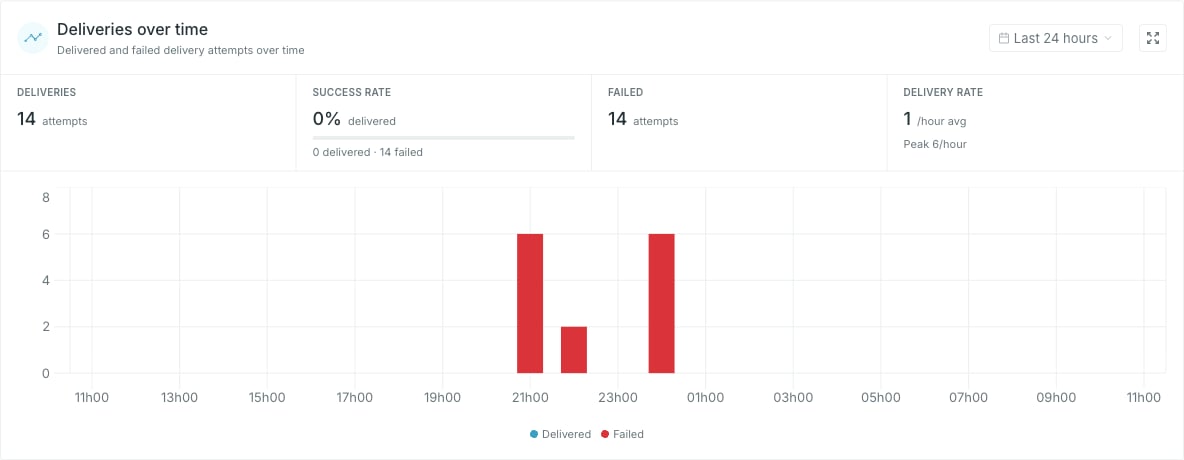 The range picker opens on **Last 24 hours**. It offers presets **By time** — from **Last 10 minutes** to **Last 72 hours** — and **By date** — **Last 7 days** through **This month** — or pick a start and end day in the calendar and click **Apply**. **Last 10 minutes** is a live view: the window rolls forward and the chart refreshes every minute.
Bars are stacked per bucket — **Delivered** and **Failed**, plus **Other** if the API reports an outcome Studio does not recognise. The bucket width follows the range: one minute up to an hour, one hour up to three days, one day beyond that.
| Stat | What it counts |
| ----------------- | --------------------------------------------------------------------------------------------------------------------- |
| **Deliveries** | Deliveries that reached a final delivered or failed outcome in the range, plus any other outcomes reported by the API |
| **Success rate** | Delivered as a share of delivered plus failed. Outcomes counted as *other* are left out |
| **Failed** | Deliveries that reached a final failure in the range |
| **Delivery rate** | Average final delivery outcomes per bucket, with the busiest bucket as **Peak** |
The unit on **Delivery rate** follows the bucket width — `/min`, `/hour` or `/day`.
Each delivery contributes once, when its final outcome occurs. A delivery that fails twice and then succeeds contributes one **Delivered** and zero **Failed**. Queued, retrying and cancelled deliveries do not contribute to these metrics.
A range with no data shows **No deliveries available** rather than an empty chart. Widen the range before reading that as a problem.
## Recent deliveries
The range picker opens on **Last 24 hours**. It offers presets **By time** — from **Last 10 minutes** to **Last 72 hours** — and **By date** — **Last 7 days** through **This month** — or pick a start and end day in the calendar and click **Apply**. **Last 10 minutes** is a live view: the window rolls forward and the chart refreshes every minute.
Bars are stacked per bucket — **Delivered** and **Failed**, plus **Other** if the API reports an outcome Studio does not recognise. The bucket width follows the range: one minute up to an hour, one hour up to three days, one day beyond that.
| Stat | What it counts |
| ----------------- | --------------------------------------------------------------------------------------------------------------------- |
| **Deliveries** | Deliveries that reached a final delivered or failed outcome in the range, plus any other outcomes reported by the API |
| **Success rate** | Delivered as a share of delivered plus failed. Outcomes counted as *other* are left out |
| **Failed** | Deliveries that reached a final failure in the range |
| **Delivery rate** | Average final delivery outcomes per bucket, with the busiest bucket as **Peak** |
The unit on **Delivery rate** follows the bucket width — `/min`, `/hour` or `/day`.
Each delivery contributes once, when its final outcome occurs. A delivery that fails twice and then succeeds contributes one **Delivered** and zero **Failed**. Queued, retrying and cancelled deliveries do not contribute to these metrics.
A range with no data shows **No deliveries available** rather than an empty chart. Widen the range before reading that as a problem.
## Recent deliveries
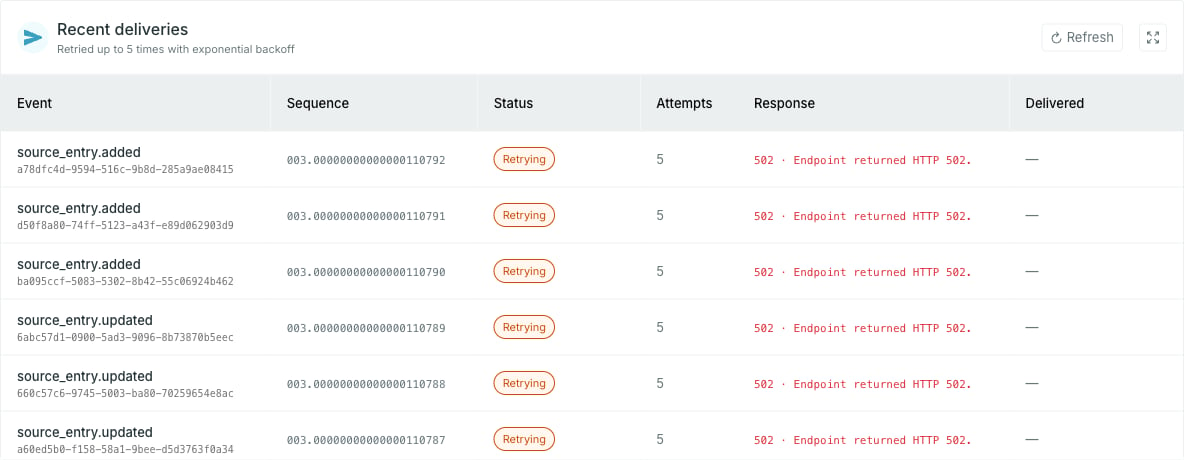 One row per delivery, newest first: the event type with its event id underneath, the **Sequence** that orders it in the stream, the current status, how many attempts it has taken, the response, and when it was delivered.
| Status | Meaning |
| ----------------- | -------------------------------------------------------------------------- |
| **Queued** | Accepted, not attempted yet |
| **Retrying** | An attempt failed and another is scheduled |
| **Delivered** | The target accepted it |
| **Dead-lettered** | Delivery failed permanently or retries were exhausted. Occtoo stops trying |
| **Cancelled** | The delivery was cancelled and will not be attempted again |
Retryable failures are retried with increasing delays, then dead-lettered if the retry limit is reached. Permanent failures are dead-lettered immediately. For example, an HTTP `400` response is not retried, and `410 Gone` also disables the subscription. Repeated authorization failures can pause a subscription automatically.
**Attempts** counts every attempt including the first, so it keeps climbing while a row stays in **Retrying**.
**Response** shows the recorded status code, with an error description where available. Webhooks show the endpoint's HTTP status. Azure Storage Queue failures can also show status codes such as `403` or `404`. Deliveries with no recorded status code show `—`, including successful queue sends and Service Bus deliveries.
The widget holds the 25 most recent deliveries. The expand control opens the full list, which loads more as you scroll, and **Refresh** re-reads the log in either view.
Delivery is at least once: a delivery that timed out may still have been processed, and the retry then arrives as a duplicate. For webhooks, deduplicate on the `webhook-id` header. For Azure queues or topics, use the CloudEvent's `source` and `id` together. Service Bus also exposes an `occtoo-delivery-id` message property. Record the identity with your processing result so a repeat is not processed twice.
One row per delivery, newest first: the event type with its event id underneath, the **Sequence** that orders it in the stream, the current status, how many attempts it has taken, the response, and when it was delivered.
| Status | Meaning |
| ----------------- | -------------------------------------------------------------------------- |
| **Queued** | Accepted, not attempted yet |
| **Retrying** | An attempt failed and another is scheduled |
| **Delivered** | The target accepted it |
| **Dead-lettered** | Delivery failed permanently or retries were exhausted. Occtoo stops trying |
| **Cancelled** | The delivery was cancelled and will not be attempted again |
Retryable failures are retried with increasing delays, then dead-lettered if the retry limit is reached. Permanent failures are dead-lettered immediately. For example, an HTTP `400` response is not retried, and `410 Gone` also disables the subscription. Repeated authorization failures can pause a subscription automatically.
**Attempts** counts every attempt including the first, so it keeps climbing while a row stays in **Retrying**.
**Response** shows the recorded status code, with an error description where available. Webhooks show the endpoint's HTTP status. Azure Storage Queue failures can also show status codes such as `403` or `404`. Deliveries with no recorded status code show `—`, including successful queue sends and Service Bus deliveries.
The widget holds the 25 most recent deliveries. The expand control opens the full list, which loads more as you scroll, and **Refresh** re-reads the log in either view.
Delivery is at least once: a delivery that timed out may still have been processed, and the retry then arrives as a duplicate. For webhooks, deduplicate on the `webhook-id` header. For Azure queues or topics, use the CloudEvent's `source` and `id` together. Service Bus also exposes an `occtoo-delivery-id` message property. Record the identity with your processing result so a repeat is not processed twice.