> ## Documentation Index
> Fetch the complete documentation index at: https://docs.occtoo.com/llms.txt
> Use this file to discover all available pages before exploring further.
# Export, copy, archive and delete a segment
> The actions available in the segment menu.
Open a segment and press the menu in the upper right corner.
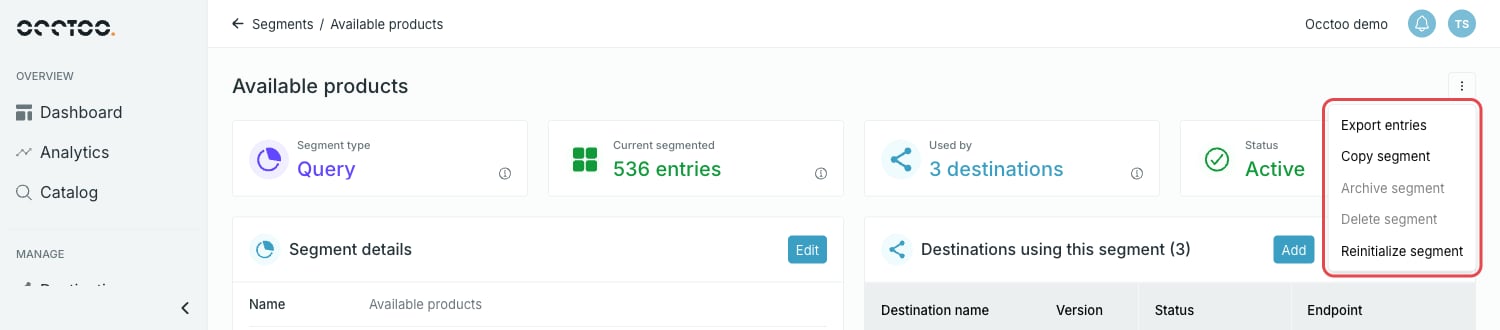 ## Export entries
Exports the entries of the segment to a file.
## Export entries
Exports the entries of the segment to a file.
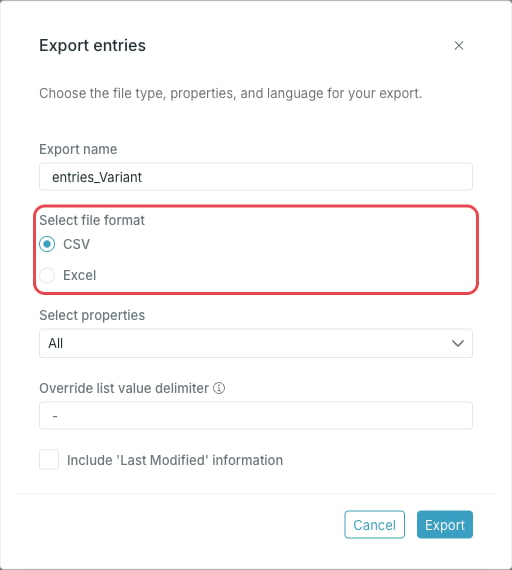 * **Export name**
* **Select file format** — CSV or Excel
* **Select properties** — all properties, or a selection
* **Select language(s)** — for cards with localized content
* **Override list value delimiter** — the delimiter used to separate values on list properties. Left blank, the original delimiter is kept.
* **Include 'Last Modified' information**
Press **Export**. The export runs in the background and you can follow it in the Notification Center, where the finished file can be downloaded.
## Copy segment
Opens the segment flow with the filters and exclusions of the current segment already in place. The card and the category are locked, and you give the copy a new name and description.
## Archive segment
Archiving stops updates and removes the segment from all destinations. The data is preserved as it stands, and the segment can be restored later with **Restore segment** on the segment page.
A segment that is in use cannot be archived when a destination is connected in a way that blocks automatic removal. Remove the connection on the **Destinations** page first. A segment that is updating cannot be archived either.
## Delete segment
Deletes the segment and all its details. This cannot be undone.
Segments used in destinations cannot be deleted.
## Reinitialize segment
Restarts the initialization of the segment. The status is reset and the entries are processed again. Use it when a segment looks out of sync with its criteria.
Archive, delete and reinitialize all ask for confirmation before they run.
* **Export name**
* **Select file format** — CSV or Excel
* **Select properties** — all properties, or a selection
* **Select language(s)** — for cards with localized content
* **Override list value delimiter** — the delimiter used to separate values on list properties. Left blank, the original delimiter is kept.
* **Include 'Last Modified' information**
Press **Export**. The export runs in the background and you can follow it in the Notification Center, where the finished file can be downloaded.
## Copy segment
Opens the segment flow with the filters and exclusions of the current segment already in place. The card and the category are locked, and you give the copy a new name and description.
## Archive segment
Archiving stops updates and removes the segment from all destinations. The data is preserved as it stands, and the segment can be restored later with **Restore segment** on the segment page.
A segment that is in use cannot be archived when a destination is connected in a way that blocks automatic removal. Remove the connection on the **Destinations** page first. A segment that is updating cannot be archived either.
## Delete segment
Deletes the segment and all its details. This cannot be undone.
Segments used in destinations cannot be deleted.
## Reinitialize segment
Restarts the initialization of the segment. The status is reset and the entries are processed again. Use it when a segment looks out of sync with its criteria.
Archive, delete and reinitialize all ask for confirmation before they run.