> ## Documentation Index
> Fetch the complete documentation index at: https://docs.occtoo.com/llms.txt
> Use this file to discover all available pages before exploring further.
# Managed tags
> Centrally maintained lists of predefined values that card properties can draw from.
Managed tags are reusable, centrally maintained lists of predefined values that can be referenced across multiple data models and experiences within Occtoo. They are a consistent way to define and manage shared attributes — product categories, regions, customer types, brands, languages — keeping data aligned across all connected systems and channels.
They give you a controlled vocabulary. Instead of typing or recreating values, a property references a single authoritative list, so every team and experience uses the same terminology.
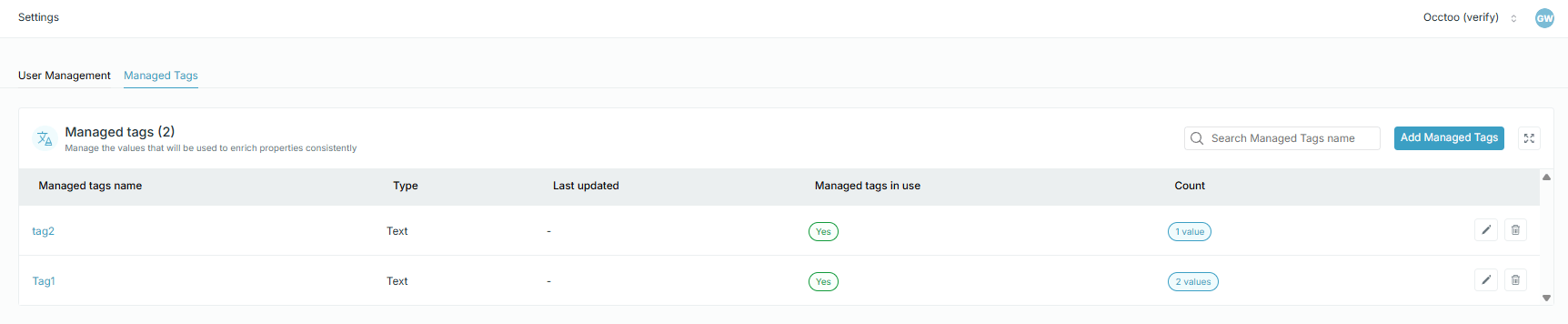
They live under **Settings → Managed Tags**.
## Create a list
Each tag list can hold many items, each with a unique key (ID) and a readable label. The display values can be localized as well as plain strings.
 ## Use a list on a property
To assign a managed tag list to a property, edit the property on its card and choose the list under **Assign tag**. **Use the key of the tag** decides whether the entry stores the key or the label — see [Update a property](/guides/studio/cards/update-a-property).
## Use a list on a property
To assign a managed tag list to a property, edit the property on its card and choose the list under **Assign tag**. **Use the key of the tag** decides whether the entry stores the key or the label — see [Update a property](/guides/studio/cards/update-a-property).
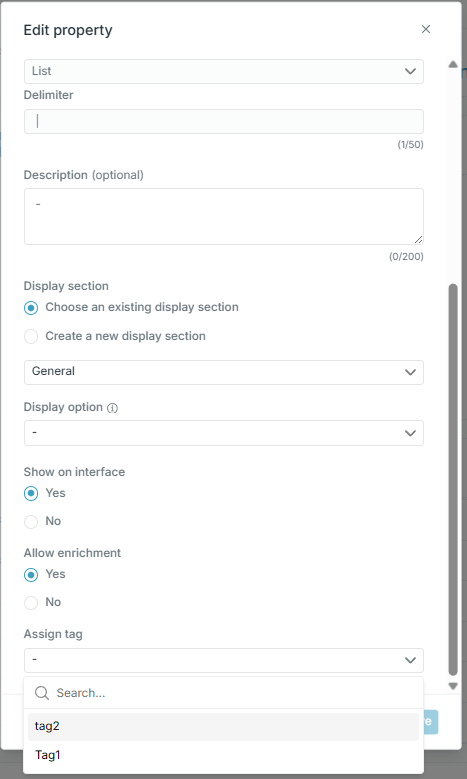 Once a property is bound to a list, entry editing offers the list's values instead of a free-text field, and filters on that property offer the same values — see [Enrich an entry](/guides/studio/catalog/enrich-an-entry).