> ## Documentation Index
> Fetch the complete documentation index at: https://docs.occtoo.com/llms.txt
> Use this file to discover all available pages before exploring further.
# Add a data provider
> Register an integration that may write to sources, and store its secret.
A data provider is the identity an integration uses to write into sources. Before an integration can onboard anything, it needs a provider with access to the sources it will write to.
Open **Sources** in the left navigation and switch to the **Data providers** tab.
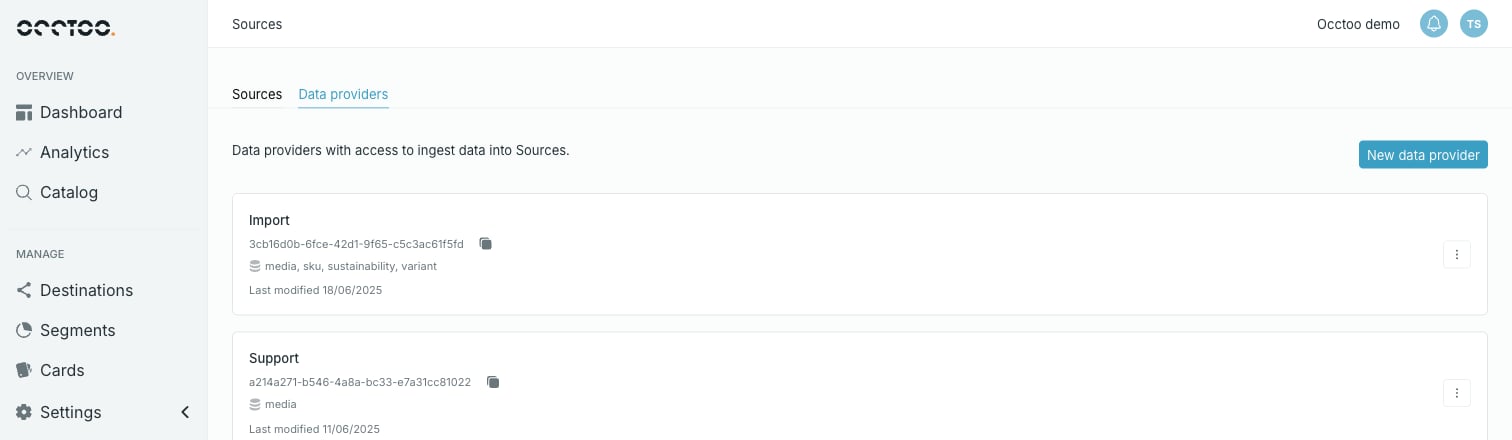 Each provider shows its name, its provider ID with a copy button, the identifiers of its allowed sources, and when it was last modified.
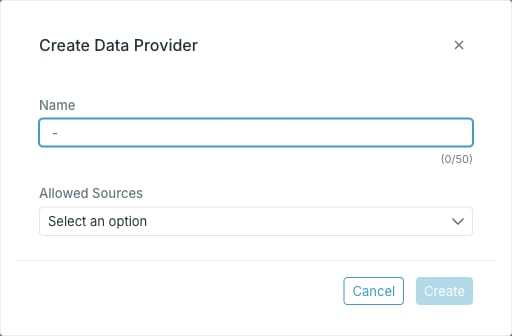 * **Name** — required.
* **Allowed Sources** — the sources this provider may write to. Pick as many as needed.
The dialog stays open and shows the generated secret. Copy it with the copy button.
The secret is shown once and never again. Closing the dialog without copying it loses it for good, and the only way forward is to [reset the secret](/guides/studio/sources/reset-a-client-secret). Studio warns you once if you try, but a second attempt closes anyway.
## Allowed sources
**Allowed Sources** is the whole of a provider's authorisation: it can write to those sources and nothing else. That lets you scope integrations — several providers writing to one source, or one provider restricted to a single source.
A source's own page lists the providers that may write to it, in the **Providers** chip row — see [Track usage of source data](/guides/studio/sources/track-usage).
## Next
With the provider ID and secret, the integration can get a token and start onboarding. See [Import data](/guides/studio/sources/import-data), or copy a working snippet from [View code examples](/guides/studio/sources/code-examples).
* **Name** — required.
* **Allowed Sources** — the sources this provider may write to. Pick as many as needed.
The dialog stays open and shows the generated secret. Copy it with the copy button.
The secret is shown once and never again. Closing the dialog without copying it loses it for good, and the only way forward is to [reset the secret](/guides/studio/sources/reset-a-client-secret). Studio warns you once if you try, but a second attempt closes anyway.
## Allowed sources
**Allowed Sources** is the whole of a provider's authorisation: it can write to those sources and nothing else. That lets you scope integrations — several providers writing to one source, or one provider restricted to a single source.
A source's own page lists the providers that may write to it, in the **Providers** chip row — see [Track usage of source data](/guides/studio/sources/track-usage).
## Next
With the provider ID and secret, the integration can get a token and start onboarding. See [Import data](/guides/studio/sources/import-data), or copy a working snippet from [View code examples](/guides/studio/sources/code-examples).