> ## Documentation Index
> Fetch the complete documentation index at: https://docs.occtoo.com/llms.txt
> Use this file to discover all available pages before exploring further.
# Add or edit a property
> Define a source property, or change the type, capabilities and display section of an existing one.
**Add property** and the pencil on a row both open the same form. Add mode is titled **Add property** with an **Add** button; edit mode is **Edit property** with **Save**.
## Add a property
In the **Properties** widget on the source page.
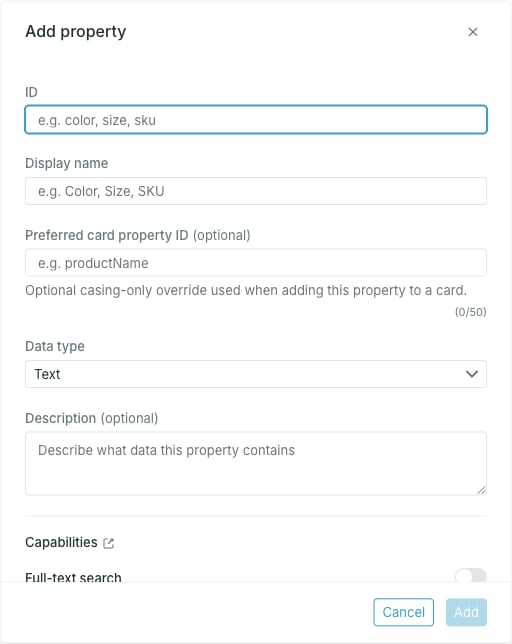 * **ID** — required. Letters, digits, hyphens and underscores, starting with a lowercase letter. It has to be unique in the source, and `id` is reserved.
* **Display name** — required. The name shown in Studio.
* **Preferred card property ID** — a casing-only override for the identifier suggested when this property is added to a card.
* **Data type** — required, defaults to **Text**.
* **Delimiter** — appears for **List** and **Localized list**, and is required there.
* **Description** — optional free text, shown under the ID in the property table.
Studio lowercases the ID it sends, so `colorCode` is stored as `colorcode`. Use **Display name** for the casing you want to read in Studio.
Choose whether the property can be searched, filtered and converted. See [Property capabilities](/guides/studio/sources/property-capabilities).
* **ID** — required. Letters, digits, hyphens and underscores, starting with a lowercase letter. It has to be unique in the source, and `id` is reserved.
* **Display name** — required. The name shown in Studio.
* **Preferred card property ID** — a casing-only override for the identifier suggested when this property is added to a card.
* **Data type** — required, defaults to **Text**.
* **Delimiter** — appears for **List** and **Localized list**, and is required there.
* **Description** — optional free text, shown under the ID in the property table.
Studio lowercases the ID it sends, so `colorCode` is stored as `colorcode`. Use **Display name** for the casing you want to read in Studio.
Choose whether the property can be searched, filtered and converted. See [Property capabilities](/guides/studio/sources/property-capabilities).
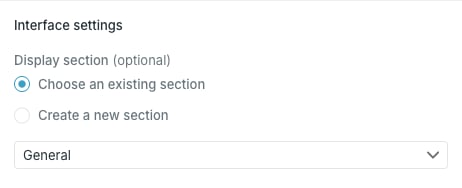 **Display section** is the only interface setting on the form. **Choose an existing section** picks one of the source's sections; **Create a new section** lets you type a new name.
The form does not decide whether the property gets a column in the entries table. That table shows the first six properties by display order — to add one, move it into the first six with **Edit order and sections**. See [Display sections and order](/guides/studio/sources/order-and-sections).
**Add** stays disabled until you change something.
Changing the display section is a second save behind the scenes, because sections live on the source rather than on the property. If the property saves but the section does not, the error refers to the section and the property change is already in place.
## Edit a property
**Display section** is the only interface setting on the form. **Choose an existing section** picks one of the source's sections; **Create a new section** lets you type a new name.
The form does not decide whether the property gets a column in the entries table. That table shows the first six properties by display order — to add one, move it into the first six with **Edit order and sections**. See [Display sections and order](/guides/studio/sources/order-and-sections).
**Add** stays disabled until you change something.
Changing the display section is a second save behind the scenes, because sections live on the source rather than on the property. If the property saves but the section does not, the error refers to the section and the property change is already in place.
## Edit a property
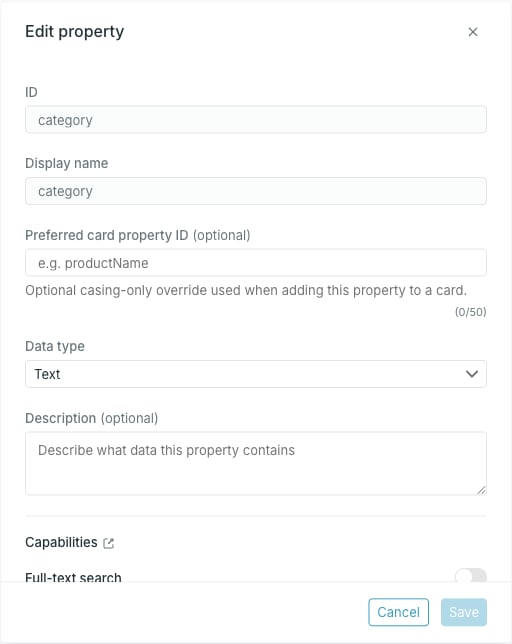 **ID** and **Display name** are read-only in edit mode. Everything else can be changed: preferred card property ID, data type, delimiter, description, capabilities and display section.
Changing the data type of a property that already holds data changes how existing values are read. Check what the source is sending before switching type, especially between **Text** and the list types, where the delimiter decides how a value splits.
The property goes to **Updating** while the change is applied, and cannot be edited again until it is **Active**.
## Preferred card property ID
This field only changes casing — the value has to match the property ID letter for letter apart from case.
Where the source already suggests an identifier, that suggestion is the field's placeholder and leaving the field empty uses it.
## Delimiters
**List** and **Localized list** need a delimiter, because a list arrives as one string that Occtoo splits. The options are comma, semicolon, pipe, slash and colon.
Switch a list property to a non-list type and the delimiter clears itself.
**ID** and **Display name** are read-only in edit mode. Everything else can be changed: preferred card property ID, data type, delimiter, description, capabilities and display section.
Changing the data type of a property that already holds data changes how existing values are read. Check what the source is sending before switching type, especially between **Text** and the list types, where the delimiter decides how a value splits.
The property goes to **Updating** while the change is applied, and cannot be edited again until it is **Active**.
## Preferred card property ID
This field only changes casing — the value has to match the property ID letter for letter apart from case.
Where the source already suggests an identifier, that suggestion is the field's placeholder and leaving the field empty uses it.
## Delimiters
**List** and **Localized list** need a delimiter, because a list arrives as one string that Occtoo splits. The options are comma, semicolon, pipe, slash and colon.
Switch a list property to a non-list type and the delimiter clears itself.