> ## Documentation Index
> Fetch the complete documentation index at: https://docs.occtoo.com/llms.txt
> Use this file to discover all available pages before exploring further.
# View code examples
> Copy a ready-made ingest snippet, prefilled with a provider ID and source identifier.
Studio can generate a working onboarding snippet for any data provider, so you do not have to assemble the token call and the ingest call by hand.
On the **Data providers** tab, press the menu on the provider and choose **View code examples**.
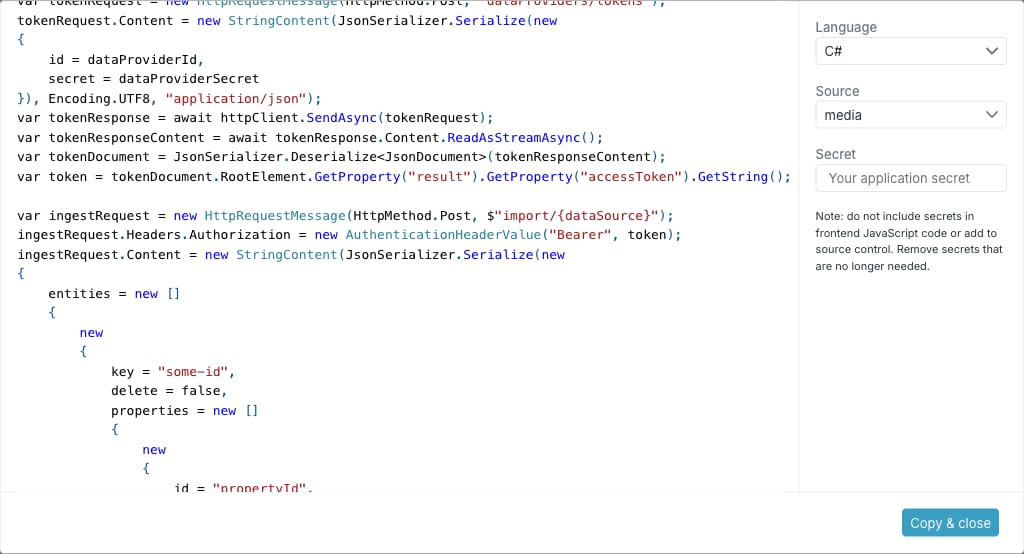 * **Language** — **C#** or **JavaScript**.
* **Source** — one of the provider's allowed sources. The snippet is written for the identifier of the source you pick.
* **Secret** — optional. Paste the provider secret and it is written into the snippet; leave it empty and the snippet carries a placeholder instead.
The provider ID is filled in for you.
Use the copy button above the snippet, or **Copy & close** to copy and dismiss the dialog.
## What the snippet does
Both languages follow the same two steps: post the provider ID and secret to get an access token, then post entries to the import endpoint for the chosen source, with the token as a bearer header.
The entity shape is visible in the snippet — a `key` for the entry ID, a `delete` flag, and a `properties` array where each property has an `id`, a `value` and an optional `language`.
If you paste the secret to generate the snippet, strip it before committing the code. Never ship a provider secret in frontend JavaScript or into source control.
The snippet is a starting point for the token and ingest calls. For the full API, see [Ingest API overview](/api-reference/ingest/overview) and [Application token](/api-reference/authentication/application-token).
* **Language** — **C#** or **JavaScript**.
* **Source** — one of the provider's allowed sources. The snippet is written for the identifier of the source you pick.
* **Secret** — optional. Paste the provider secret and it is written into the snippet; leave it empty and the snippet carries a placeholder instead.
The provider ID is filled in for you.
Use the copy button above the snippet, or **Copy & close** to copy and dismiss the dialog.
## What the snippet does
Both languages follow the same two steps: post the provider ID and secret to get an access token, then post entries to the import endpoint for the chosen source, with the token as a bearer header.
The entity shape is visible in the snippet — a `key` for the entry ID, a `delete` flag, and a `properties` array where each property has an `id`, a `value` and an optional `language`.
If you paste the secret to generate the snippet, strip it before committing the code. Never ship a provider secret in frontend JavaScript or into source control.
The snippet is a starting point for the token and ingest calls. For the full API, see [Ingest API overview](/api-reference/ingest/overview) and [Application token](/api-reference/authentication/application-token).