> ## Documentation Index
> Fetch the complete documentation index at: https://docs.occtoo.com/llms.txt
> Use this file to discover all available pages before exploring further.
# Delete a source
> Remove a source that is empty and no longer referenced.
Open the source and press the menu in the top right corner.
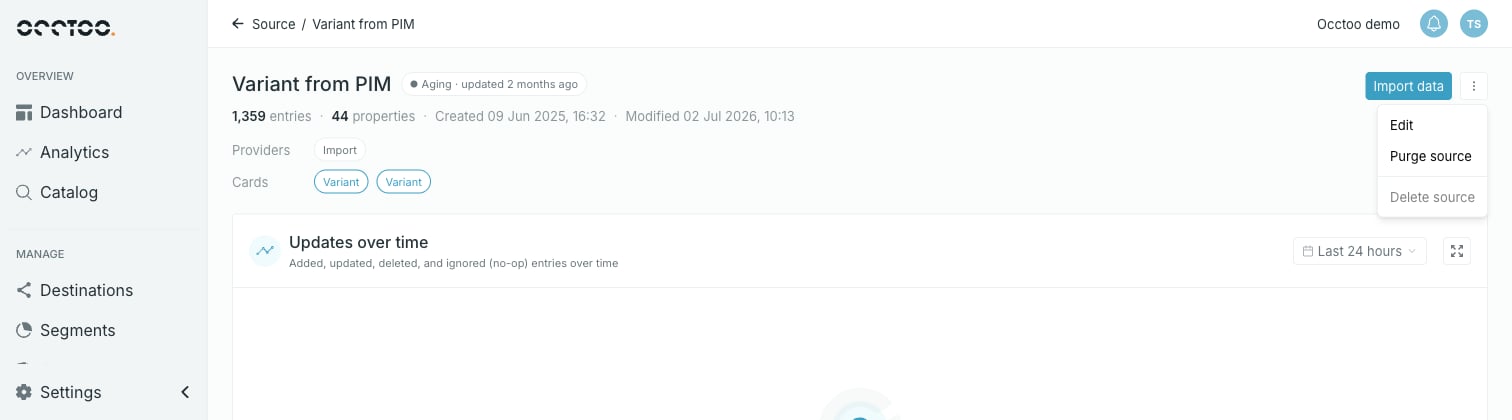 **Delete source** is disabled unless the source is empty and unreferenced — no entries, no card built on it, and no data provider listing it.
To clear the blockers: [purge the source](/guides/studio/sources/purge-a-source) to remove its entries, remove the source from any card built on it, and remove it from the **Allowed Sources** of every data provider that lists it.
**Delete source** is disabled unless the source is empty and unreferenced — no entries, no card built on it, and no data provider listing it.
To clear the blockers: [purge the source](/guides/studio/sources/purge-a-source) to remove its entries, remove the source from any card built on it, and remove it from the **Allowed Sources** of every data provider that lists it.
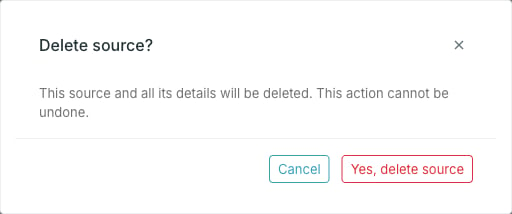 Studio returns you to the source list.
Deletion cannot be undone. The source, its properties and its configuration are all removed.
Deleting is unavailable while a purge is running.
Studio returns you to the source list.
Deletion cannot be undone. The source, its properties and its configuration are all removed.
Deleting is unavailable while a purge is running.