> ## Documentation Index
> Fetch the complete documentation index at: https://docs.occtoo.com/llms.txt
> Use this file to discover all available pages before exploring further.
# Edit a data provider
> Rename a provider or change which sources it may write to.
On the **Data providers** tab, press the menu on the provider you want to change.
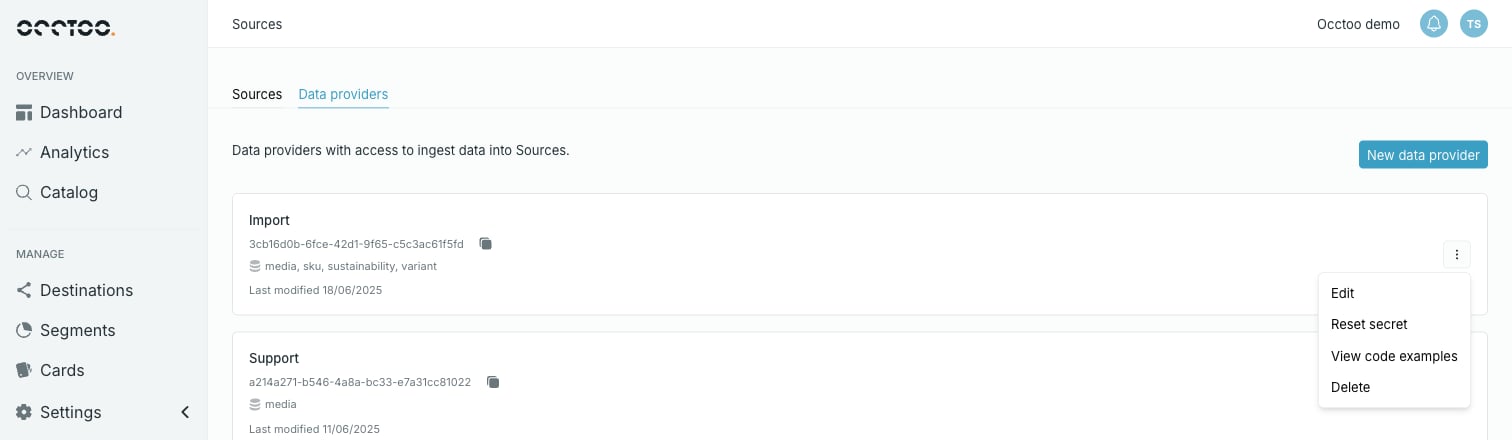 The menu holds **Edit**, **Reset secret**, **View code examples** and **Delete**.
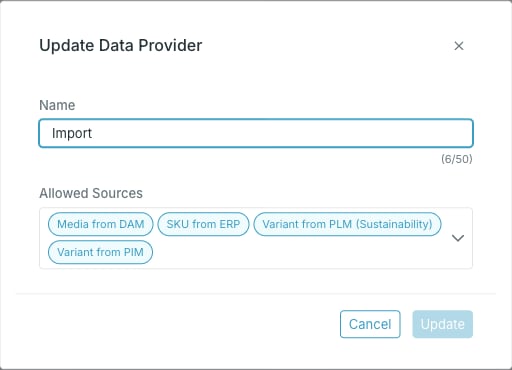 * **Name**.
* **Allowed Sources** — add or remove sources. Each allowed source appears as a chip; removing a chip revokes the provider's access to that source.
**Update** stays disabled until you change something.
Removing a source from **Allowed Sources** takes effect immediately. Any integration still pushing to that source with this provider will start failing. Check the source's **Providers** chip row first to see whether another provider still covers it.
The provider ID does not change when you rename a provider, so integrations keep working.
The secret is not editable here — to replace it, see [Reset a provider secret](/guides/studio/sources/reset-a-client-secret).
* **Name**.
* **Allowed Sources** — add or remove sources. Each allowed source appears as a chip; removing a chip revokes the provider's access to that source.
**Update** stays disabled until you change something.
Removing a source from **Allowed Sources** takes effect immediately. Any integration still pushing to that source with this provider will start failing. Check the source's **Providers** chip row first to see whether another provider still covers it.
The provider ID does not change when you rename a provider, so integrations keep working.
The secret is not editable here — to replace it, see [Reset a provider secret](/guides/studio/sources/reset-a-client-secret).