> ## Documentation Index
> Fetch the complete documentation index at: https://docs.occtoo.com/llms.txt
> Use this file to discover all available pages before exploring further.
# Property capabilities
> Make a property searchable, filterable, or exposable as another type on a card.
Capabilities decide what Occtoo can do with a property beyond storing it. They are set in the **Capabilities** section of the add and edit property form, and shown as icons in the **Capabilities** column of the property table.
 ## The three capabilities
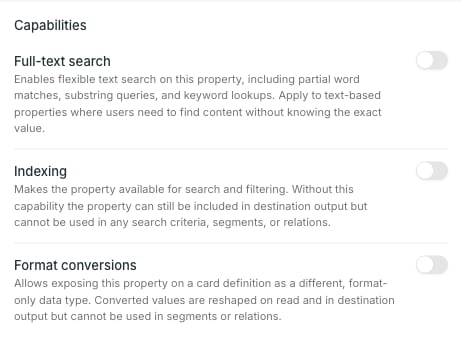
**Full-text search** — flexible text search on the property, including partial word and substring matches. For text values users need to find without knowing them exactly.
**Indexing** — makes the property available for search and filtering. Without it the property can still be sent to destinations, but cannot be used in search criteria, segments or relations.
**Format conversions** — lets the property be exposed on a card as a different, format-only data type.
Which capabilities appear depends on the property's data type. A **Text** property offers all three; a **List** property offers **Indexing** and **Format conversions** but not **Full-text search**. If none apply to the type, the whole section is hidden.
## Indexing decides what is sortable
Only indexed properties can be ordered on. In the entries table, a column header is clickable for sorting when its property has **Indexing**, and plain text when it does not. The same applies to using the property in segments and relations. **Entry ID** and **Last modified** are exceptions — the index tracks both for every source, so they sort without any capability being set.
### Source format, for timestamps
Turn **Indexing** on for a **Timestamp** property and an optional **Source format** field appears. Set it when the source sends dates in something other than ISO-8601.
**Source format** is only valid for **Timestamp**. On any other data type the value is dropped rather than sent.
## Format conversions
Turn **Format conversions** on and a list of target types appears.
## The three capabilities
**Full-text search** — flexible text search on the property, including partial word and substring matches. For text values users need to find without knowing them exactly.
**Indexing** — makes the property available for search and filtering. Without it the property can still be sent to destinations, but cannot be used in search criteria, segments or relations.
**Format conversions** — lets the property be exposed on a card as a different, format-only data type.
Which capabilities appear depends on the property's data type. A **Text** property offers all three; a **List** property offers **Indexing** and **Format conversions** but not **Full-text search**. If none apply to the type, the whole section is hidden.
## Indexing decides what is sortable
Only indexed properties can be ordered on. In the entries table, a column header is clickable for sorting when its property has **Indexing**, and plain text when it does not. The same applies to using the property in segments and relations. **Entry ID** and **Last modified** are exceptions — the index tracks both for every source, so they sort without any capability being set.
### Source format, for timestamps
Turn **Indexing** on for a **Timestamp** property and an optional **Source format** field appears. Set it when the source sends dates in something other than ISO-8601.
**Source format** is only valid for **Timestamp**. On any other data type the value is dropped rather than sent.
## Format conversions
Turn **Format conversions** on and a list of target types appears.
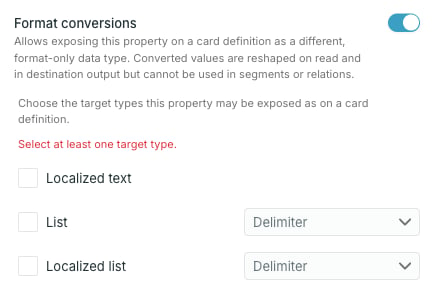 The available targets come from the source data type. A **Text** property can be exposed as **Localized text**, **List** or **Localized list**; a **List** property can be exposed as **Text**. List targets need their own delimiter, since the source type has none to inherit.
At least one target has to be selected.
Once a card uses a converted type, that target is locked and the **Format conversions** switch cannot be turned off. The tooltip names the cards holding it — remove the converted property from those cards first.
A conversion changes only the shape of the value on read and in destination output. It does not make the property usable in segments or relations — that needs **Indexing** on the source property itself.
## Reading the icons
In the property table each enabled capability shows one icon, named on hover: a magnifier for **Full-text search**, a database for **Indexing**, and a compare icon for **Format conversions**. `—` means the property has none.
The available targets come from the source data type. A **Text** property can be exposed as **Localized text**, **List** or **Localized list**; a **List** property can be exposed as **Text**. List targets need their own delimiter, since the source type has none to inherit.
At least one target has to be selected.
Once a card uses a converted type, that target is locked and the **Format conversions** switch cannot be turned off. The tooltip names the cards holding it — remove the converted property from those cards first.
A conversion changes only the shape of the value on read and in destination output. It does not make the property usable in segments or relations — that needs **Indexing** on the source property itself.
## Reading the icons
In the property table each enabled capability shows one icon, named on hover: a magnifier for **Full-text search**, a database for **Indexing**, and a compare icon for **Format conversions**. `—` means the property has none.