> ## Documentation Index
> Fetch the complete documentation index at: https://docs.occtoo.com/llms.txt
> Use this file to discover all available pages before exploring further.
# Remove a data provider
> Unregister a data provider and revoke its access to every source.
On the **Data providers** tab, press the menu on the provider and choose **Delete**.
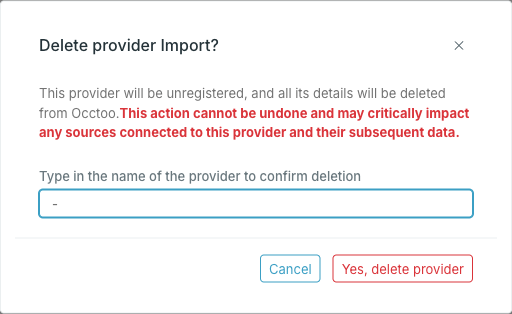 Type the provider name to confirm. It has to match exactly.
The provider is unregistered immediately.
Deleting a provider revokes its credentials immediately. Any integration using its ID and secret stops being able to onboard data, and there is no way to restore the provider or its secret — a replacement gets a new ID and a new secret, which every integration then has to be updated with.
## Before you delete
Check what the provider feeds. Open each source it lists and look at the **Providers** chip row — if this is the only provider on a source, nothing will be writing to that source after the deletion. Data already onboarded stays; it just stops being updated.
To take away access to one source without unregistering the provider, remove that source from **Allowed Sources** instead — see [Edit a data provider](/guides/studio/sources/edit-a-data-provider).
Type the provider name to confirm. It has to match exactly.
The provider is unregistered immediately.
Deleting a provider revokes its credentials immediately. Any integration using its ID and secret stops being able to onboard data, and there is no way to restore the provider or its secret — a replacement gets a new ID and a new secret, which every integration then has to be updated with.
## Before you delete
Check what the provider feeds. Open each source it lists and look at the **Providers** chip row — if this is the only provider on a source, nothing will be writing to that source after the deletion. Data already onboarded stays; it just stops being updated.
To take away access to one source without unregistering the provider, remove that source from **Allowed Sources** instead — see [Edit a data provider](/guides/studio/sources/edit-a-data-provider).