> ## Documentation Index
> Fetch the complete documentation index at: https://docs.occtoo.com/llms.txt
> Use this file to discover all available pages before exploring further.
# The source page
> What the source page shows: freshness, counts, where the data comes from and goes, and the four widgets.
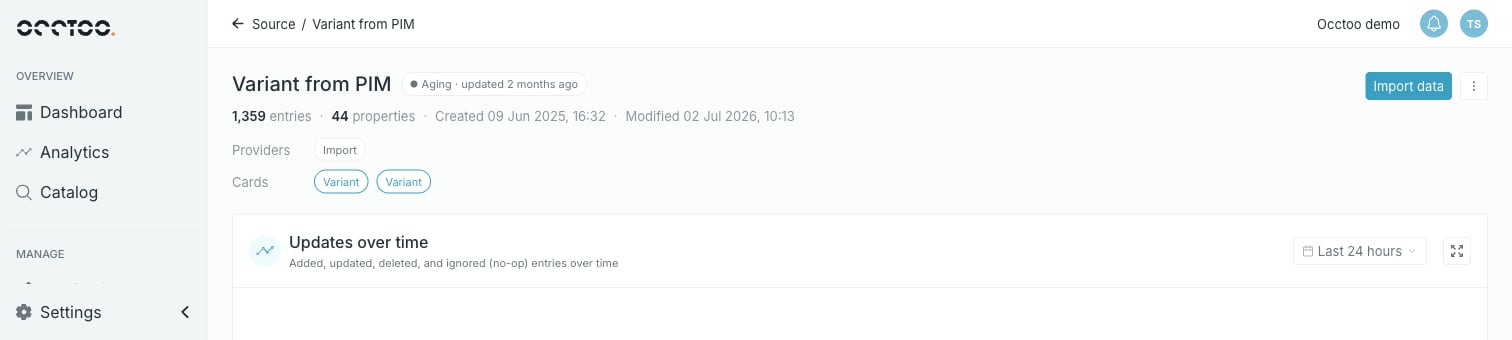
Opening a source shows everything about it on one scrolling page — a header, then four widgets: **Updates over time**, **Entries**, **Properties** and **Languages**.
 ## Header
Next to the source name is a freshness badge, based on when entries were last modified:
| Badge | Meaning |
| ---------- | ----------------------------------- |
| **Fresh** | Last modified less than 7 days ago |
| **Recent** | Last modified 7 to 30 days ago |
| **Aging** | Last modified more than 30 days ago |
The badge also carries the relative time — **Aging · updated 2 months ago**.
Under the name sits the description, then a stat line: entry count, property count, **Created** and **Modified** timestamps.
Below that, up to three chip rows show where the data comes from and where it goes:
* **Providers** — the data providers granted access to this source. Each chip opens the **Data providers** tab scrolled to that provider.
* **Cards** — the cards built on this source. Each chip opens the card.
* **Shared ID** — the sources this one shares entry IDs with. Each chip opens that source.
A row only appears when there is something in it. See [Track usage of source data](/guides/studio/sources/track-usage).
## The widgets
| Widget | What it holds |
| --------------------- | ---------------------------------------------------------------------------------------------------------------------------- |
| **Updates over time** | Ingest volume and rate over a chosen time frame — see [Monitor onboarding](/guides/studio/sources/monitor-ingest) |
| **Entries** | The entry table, its search and the import button — see [Browse and search entries](/guides/studio/sources/browse-entries) |
| **Properties** | The property table with add, edit, delete and reordering — see [Source properties](/guides/studio/sources/source-properties) |
| **Languages** | Localized value coverage per language — see [Monitor onboarding](/guides/studio/sources/monitor-ingest) |
**Updates over time**, **Entries** and **Properties** each have an expand icon in their top right corner that opens the widget full screen.
## The source menu
**Import data** and a menu sit in the top right of the page.
## Header
Next to the source name is a freshness badge, based on when entries were last modified:
| Badge | Meaning |
| ---------- | ----------------------------------- |
| **Fresh** | Last modified less than 7 days ago |
| **Recent** | Last modified 7 to 30 days ago |
| **Aging** | Last modified more than 30 days ago |
The badge also carries the relative time — **Aging · updated 2 months ago**.
Under the name sits the description, then a stat line: entry count, property count, **Created** and **Modified** timestamps.
Below that, up to three chip rows show where the data comes from and where it goes:
* **Providers** — the data providers granted access to this source. Each chip opens the **Data providers** tab scrolled to that provider.
* **Cards** — the cards built on this source. Each chip opens the card.
* **Shared ID** — the sources this one shares entry IDs with. Each chip opens that source.
A row only appears when there is something in it. See [Track usage of source data](/guides/studio/sources/track-usage).
## The widgets
| Widget | What it holds |
| --------------------- | ---------------------------------------------------------------------------------------------------------------------------- |
| **Updates over time** | Ingest volume and rate over a chosen time frame — see [Monitor onboarding](/guides/studio/sources/monitor-ingest) |
| **Entries** | The entry table, its search and the import button — see [Browse and search entries](/guides/studio/sources/browse-entries) |
| **Properties** | The property table with add, edit, delete and reordering — see [Source properties](/guides/studio/sources/source-properties) |
| **Languages** | Localized value coverage per language — see [Monitor onboarding](/guides/studio/sources/monitor-ingest) |
**Updates over time**, **Entries** and **Properties** each have an expand icon in their top right corner that opens the widget full screen.
## The source menu
**Import data** and a menu sit in the top right of the page.
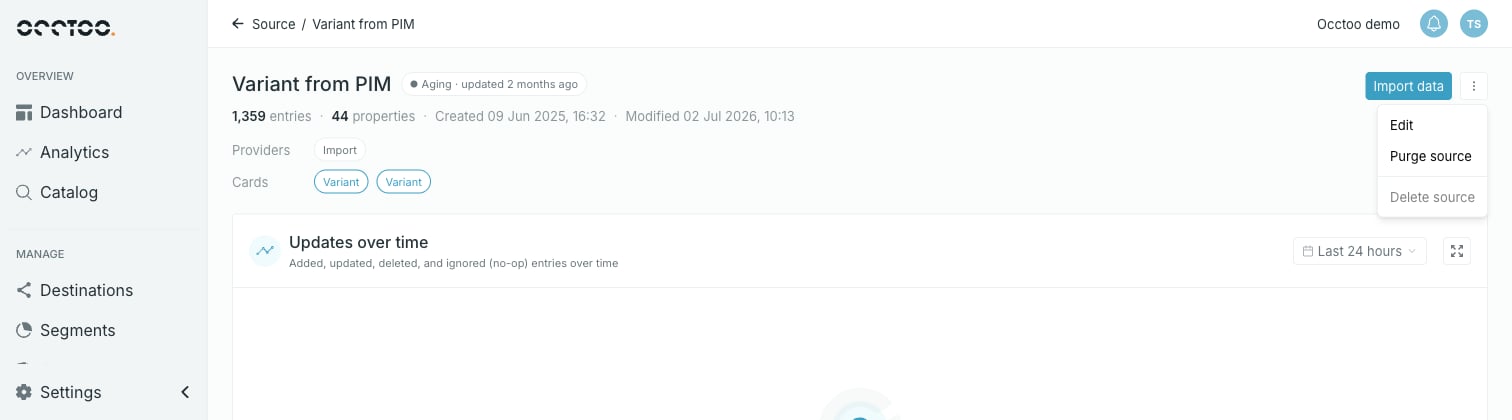 The menu holds three items:
* **Edit** — name, description and shared IDs. See [Edit a source](/guides/studio/sources/edit-a-source).
* **Purge source** — delete every entry, keep the source. See [Purge a source](/guides/studio/sources/purge-a-source).
* **Delete source** — remove the source itself. See [Delete a source](/guides/studio/sources/delete-a-data-source).
Items are disabled when the action is not possible, and the tooltip says why. On the source above, **Delete source** is disabled because the source holds entries and is used by cards.
**Purge source** is disabled on a source with no entries, and **Delete source** is disabled on a source that has entries, cards or providers. So on any given source at most one of the two is usually available.
## While a source is purging
A purge runs in the background. Until it finishes the source is locked: importing is unavailable, entries cannot be edited or deleted, and both **Purge source** and **Delete source** are disabled.
The menu holds three items:
* **Edit** — name, description and shared IDs. See [Edit a source](/guides/studio/sources/edit-a-source).
* **Purge source** — delete every entry, keep the source. See [Purge a source](/guides/studio/sources/purge-a-source).
* **Delete source** — remove the source itself. See [Delete a source](/guides/studio/sources/delete-a-data-source).
Items are disabled when the action is not possible, and the tooltip says why. On the source above, **Delete source** is disabled because the source holds entries and is used by cards.
**Purge source** is disabled on a source with no entries, and **Delete source** is disabled on a source that has entries, cards or providers. So on any given source at most one of the two is usually available.
## While a source is purging
A purge runs in the background. Until it finishes the source is locked: importing is unavailable, entries cannot be edited or deleted, and both **Purge source** and **Delete source** are disabled.