> ## Documentation Index
> Fetch the complete documentation index at: https://docs.occtoo.com/llms.txt
> Use this file to discover all available pages before exploring further.
# Source properties
> Read the property table on a source: columns, statuses, sections and search.
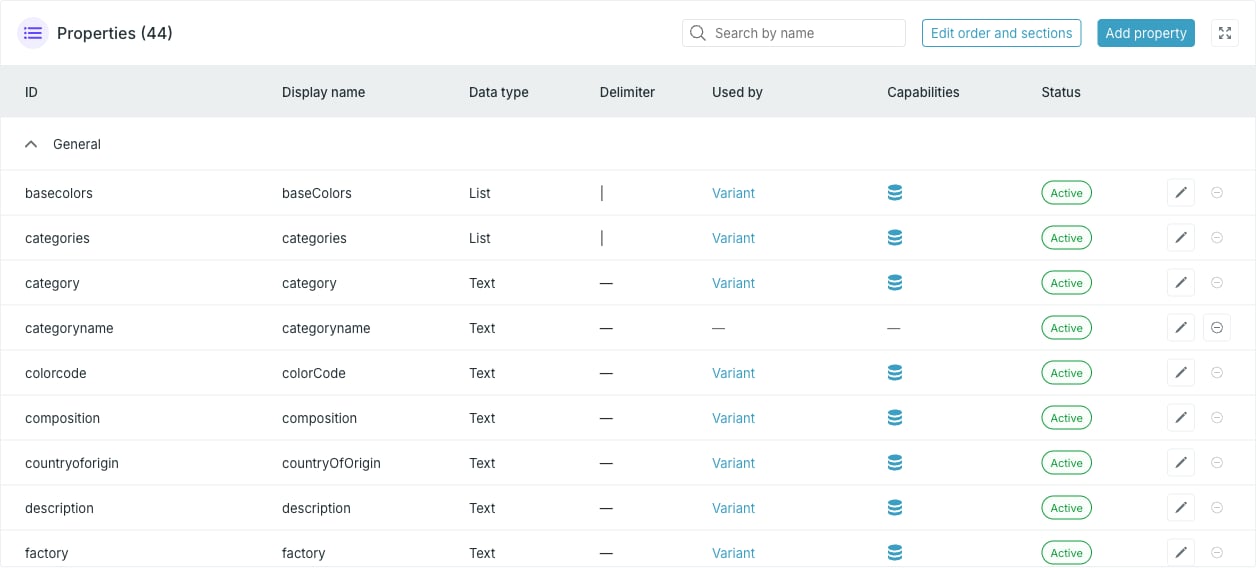
The **Properties** widget on the source page lists every property the source holds, grouped into display sections. The heading carries the total — **Properties (44)**.
 ## Columns
| Column | What it shows |
| ---------------- | ---------------------------------------------------------------------------------------------------------------------------------------------- |
| **ID** | The property identifier used by the ingest API, always lowercase. The description, if set, appears under it. |
| **Display name** | The name shown in Studio. |
| **Data type** | Text, Localized text, List, Localized list, Boolean, Integer, Decimal or Timestamp. |
| **Delimiter** | The character separating values, for **List** and **Localized list** only. Otherwise `—`. |
| **Used by** | The cards that use this property, each a link to the card. Above four, the rest collapse into **+n more**. |
| **Capabilities** | One icon per enabled capability, with the capability name on hover. See [Property capabilities](/guides/studio/sources/property-capabilities). |
| **Status** | **Active**, **Updating** or **Deleting**. |
Each row ends with an edit and a delete button.
## Status
A property is **Active** in normal use. It shows **Updating** while a change is being applied and **Deleting** while it is being removed. Both edit and delete are disabled in those states.
## Sections
Properties are grouped into collapsible display sections. Anything not assigned to a section sits in **General**. Sections are ordered by the lowest display order among their properties. See [Display sections and order](/guides/studio/sources/order-and-sections).
The same display order decides which properties get a column in the **Entries** widget — the first six do.
## Search
**Search by name** filters the table. It is a fuzzy match on the display name, so small typos still hit, and it only starts filtering past two characters. No match shows **No results**.
The search matches the **Display name** column, not the **ID**.
## Where properties come from
Properties appear on their own the first time data arrives carrying them, whether through a provider or a CSV import. Defining one up front lets you set its type, capabilities and display section before any data lands — see [Add or edit a property](/guides/studio/sources/add-and-edit-a-property).
## Actions
* **Add property** — define a new property.
* **Edit order and sections** — drag properties into order and between sections. Disabled when the source has no properties.
* The pencil on a row — edit that property.
* The remove icon on a row — delete that property. Disabled while a card uses it.
## Columns
| Column | What it shows |
| ---------------- | ---------------------------------------------------------------------------------------------------------------------------------------------- |
| **ID** | The property identifier used by the ingest API, always lowercase. The description, if set, appears under it. |
| **Display name** | The name shown in Studio. |
| **Data type** | Text, Localized text, List, Localized list, Boolean, Integer, Decimal or Timestamp. |
| **Delimiter** | The character separating values, for **List** and **Localized list** only. Otherwise `—`. |
| **Used by** | The cards that use this property, each a link to the card. Above four, the rest collapse into **+n more**. |
| **Capabilities** | One icon per enabled capability, with the capability name on hover. See [Property capabilities](/guides/studio/sources/property-capabilities). |
| **Status** | **Active**, **Updating** or **Deleting**. |
Each row ends with an edit and a delete button.
## Status
A property is **Active** in normal use. It shows **Updating** while a change is being applied and **Deleting** while it is being removed. Both edit and delete are disabled in those states.
## Sections
Properties are grouped into collapsible display sections. Anything not assigned to a section sits in **General**. Sections are ordered by the lowest display order among their properties. See [Display sections and order](/guides/studio/sources/order-and-sections).
The same display order decides which properties get a column in the **Entries** widget — the first six do.
## Search
**Search by name** filters the table. It is a fuzzy match on the display name, so small typos still hit, and it only starts filtering past two characters. No match shows **No results**.
The search matches the **Display name** column, not the **ID**.
## Where properties come from
Properties appear on their own the first time data arrives carrying them, whether through a provider or a CSV import. Defining one up front lets you set its type, capabilities and display section before any data lands — see [Add or edit a property](/guides/studio/sources/add-and-edit-a-property).
## Actions
* **Add property** — define a new property.
* **Edit order and sections** — drag properties into order and between sections. Disabled when the source has no properties.
* The pencil on a row — edit that property.
* The remove icon on a row — delete that property. Disabled while a card uses it.