> ## Documentation Index
> Fetch the complete documentation index at: https://docs.occtoo.com/llms.txt
> Use this file to discover all available pages before exploring further.
# View an entry
> Open an entry to read every property value and its change history.
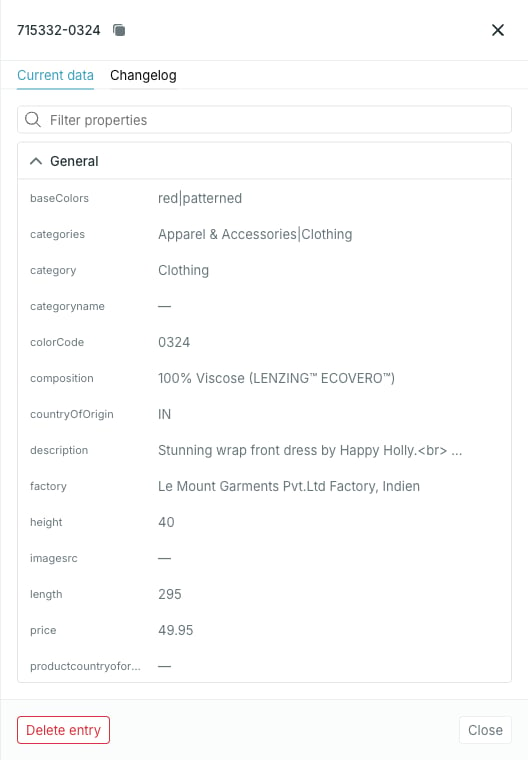
Clicking a row in the **Entries** widget opens the entry panel on the right.
 ## What the panel holds
* The **entry ID** in the header, with a copy button.
* Two tabs: **Current data** and **Changelog**.
* **Delete entry** and **Close** in the footer.
Unlike the entries table, which columns only the first six properties by
display order, the panel shows *all* properties.
## Current data
Every property on the entry, grouped into the source's display sections, with a **Filter properties** box above. Sections come from the property's display section — see [Display sections and order](/guides/studio/sources/order-and-sections).
A property with no value shows `—`. A localized property shows one row per language the source has seen, each tagged with its language code. Hovering a value reveals a copy button.
Property keys that arrived on the entry but are not defined as source
properties land in **General**, so nothing the source sent is hidden from you.
### Filter properties
**Filter properties** matches on both the property ID and the display name, and hides sections left with nothing in them. No match shows **No properties match your filter**.
## Changelog
The **Changelog** tab lists changes newest first, labelled **Added**, **Updated** or **Removed**. Each row shows the property, the before and after values, when it happened, and who or what made the change — a data provider or a Studio user. An entry with no recorded changes shows **No change history yet**.
A change credited to a data provider came from an ingest run. A change
credited to a Studio user came from enrichment on the entry in the Catalog —
see [Enrich an entry](/guides/studio/catalog/enrich-an-entry).
## Changing a value
There is no way to type over a value here. There are two ways to change what an entry holds:
* Change it at the source of the data and let it onboard again — see [Import data](/guides/studio/sources/import-data).
* Edit the value on the entry in the Catalog, where properties the card allows enrichment on are editable — see [Enrich an entry](/guides/studio/catalog/enrich-an-entry).
## Deleting
**Delete entry** in the footer removes the entry — see [Delete an entry](/guides/studio/sources/delete-an-entry).
## What the panel holds
* The **entry ID** in the header, with a copy button.
* Two tabs: **Current data** and **Changelog**.
* **Delete entry** and **Close** in the footer.
Unlike the entries table, which columns only the first six properties by
display order, the panel shows *all* properties.
## Current data
Every property on the entry, grouped into the source's display sections, with a **Filter properties** box above. Sections come from the property's display section — see [Display sections and order](/guides/studio/sources/order-and-sections).
A property with no value shows `—`. A localized property shows one row per language the source has seen, each tagged with its language code. Hovering a value reveals a copy button.
Property keys that arrived on the entry but are not defined as source
properties land in **General**, so nothing the source sent is hidden from you.
### Filter properties
**Filter properties** matches on both the property ID and the display name, and hides sections left with nothing in them. No match shows **No properties match your filter**.
## Changelog
The **Changelog** tab lists changes newest first, labelled **Added**, **Updated** or **Removed**. Each row shows the property, the before and after values, when it happened, and who or what made the change — a data provider or a Studio user. An entry with no recorded changes shows **No change history yet**.
A change credited to a data provider came from an ingest run. A change
credited to a Studio user came from enrichment on the entry in the Catalog —
see [Enrich an entry](/guides/studio/catalog/enrich-an-entry).
## Changing a value
There is no way to type over a value here. There are two ways to change what an entry holds:
* Change it at the source of the data and let it onboard again — see [Import data](/guides/studio/sources/import-data).
* Edit the value on the entry in the Catalog, where properties the card allows enrichment on are editable — see [Enrich an entry](/guides/studio/catalog/enrich-an-entry).
## Deleting
**Delete entry** in the footer removes the entry — see [Delete an entry](/guides/studio/sources/delete-an-entry).