
Occtoo MCP server

The Occtoo MCP server, hosted at mcp.occtoo.com, exposes the platform over the Model Context Protocol, the open standard for connecting AI assistants and agents to external systems. Once connected, an MCP-aware client — Claude, an IDE assistant, or your own agent — can query and manage your Occtoo tenant through a set of typed tools instead of hand-writing REST calls.

info

Tool names, parameters, and the set of available capabilities may change between releases. Treat the server's own tools listing as the authoritative contract (see Tool Reference) and pin to a known-good configuration for anything you automate.

What it is good for

The MCP server is the fastest way to let an assistant work against your tenant rather than just about it. Typical uses for a superuser:

  • Ask, in natural language, what entries exist in a source and inspect their properties without building a destination first.
  • Push a batch of data into a source during onboarding or a fix-up, then confirm it landed.
  • Audit which destinations exist, what they expose, and trace an entry through its lifecycle when something looks wrong.
  • Let an agent chain these steps — read, reason, write, verify — inside one session.

It is not a replacement for published destinations, which remain the right surface for high-volume, low-latency, application-facing reads. The MCP server is a single, tenant-wide control surface for interactive and agentic work, not a CDN-backed query API.

Capabilities

The server exposes tools across the whole platform surface:

AreaWhat you can do
Discover configurationMap the tenant graph — data sources, card definitions, segments, destinations, endpoints — and drill into any node.
Query and inspect dataSearch source entries and cards with typed filters, read raw source rows, look up distinct values, and read change history.
Import and edit dataUpsert or delete typed entries and edit data-source property schemas — the same ingest path as the Ingest API, driven by the assistant.
Build configurationCreate and update data sources, card definitions, relations, segments, destinations, API versions, and endpoints.
Inspect publishingTrace an entry's lifecycle, inspect the destination index and indexing queue, and diagnose why a card isn't published.
Read metricsList and query the tenant's operational metrics.

Before you begin

You will need:

  1. Studio access to the tenant you want to connect, with a role that covers the work you intend to do. The session acts with your Studio permissions.
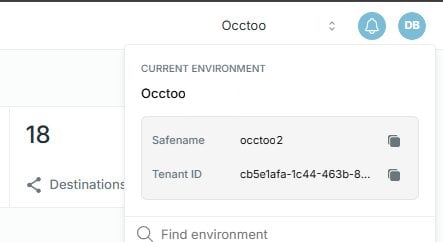
  2. Your tenant safename, which identifies the tenant you want to connect to.
  3. An MCP-capable client — for example Claude Desktop, an MCP-enabled IDE, or a custom agent built on an MCP SDK.

Set up

1. Configure your client

In your MCP client, add the Occtoo server and set its URL to https://mcp.occtoo.com/{safename}/mcp, replacing {safename} with your tenant safename. For example, a tenant with the safename contoso-retail connects to:
https://mcp.occtoo.com/contoso-retail/mcp

To access the tenant safename, log into the Studio, and access it by clicking the name of the tenant in the top right corner.

An image from the static

Most clients read a JSON config; the shape varies by client, but the URL is the same:

{
"mcpServers": {
"occtoo": {
"url": "https://mcp.occtoo.com/{safename}/mcp"
}
}
}

2. Authenticate

The first time the client connects, the server starts an authentication flow that asks you to log into Studio. Complete the login in the browser window the client opens; once you have signed in, the session is authorized to act on your tenant. No API key or secret is configured in the client — authorization comes from your Studio login.

3. Discover the tools

On connection, the server advertises its available tools via the standard MCP tools listing. Ask your client to list tools (or inspect the listing programmatically) to see the exact tool names and parameter schemas for the version you are connected to. This listing — not this page — is the source of truth for what is callable right now.

Tool reference

The tools below are grouped by what they do. Read-only tools are safe to call freely; write tools (marked) create, change, or delete configuration and data, so confirm intent before calling them.

Many write operations follow a draft → create pattern. The draft_* tools are read-only: they take your inputs, normalize them, and return a pre-filled review form for a human to confirm, then submit to the matching create_* tool. Prefer the draft_* tool when a person is in the loop; call create_* directly only for scripted or unattended flows.

Discovery

ToolDescription
whoamiReturns the authenticated principal — Occtoo tenant, Kinde organization, and the authentication method used.
list_configurationCompact skeleton of the tenant: data sources, card definitions, segment definitions, destinations, endpoints, and their links. First-stop discovery tool; pass a focus id to scope to a subgraph on large tenants.

Data sources and schema

ToolDescription
search_data_sourcesSearch data sources in the tenant; returns each source with its properties and related sources.
describe_data_source_schemaDescribe a source's properties (id, type, delimiter, localized, matching filter type). Call before search_entries for an unfamiliar source.
draft_data_source(write — draft) Preferred entry point to create a data source; opens a review form and submits to create_data_source.
create_data_source(write) Create a data source with its properties. Use directly only for scripted flows.
update_data_source(write) Update a source's metadata (name, description, relations, languages). Patch semantics; does not change the property schema.
upsert_data_source_properties(write) Create or update properties on an existing source. Changing a type or delimiter on a populated property triggers a reindex.

Entries and history

ToolDescription
search_entriesSearch data-source entries with typed filters across the composite index; supports facets and cursor paging. Use describe_data_source_schema first to pick filter types.
list_source_entriesList raw entries straight from the source's database table (bypasses the search index) — useful for inspecting exactly what was ingested. Defaults to most-recently-updated first.
import_data(write) Upsert or delete typed entries in a source. Values are validated against declared property types; the whole request is atomic.
get_entry_historyChange history for a single entry, newest first — old/new values, change type, version, author.
query_changelogSearch a source's changelog by entry id, property, date range, or change type. Good for "when was X last updated?" / "what changed since Y?".
trace_entry_lifecycleTrace one entry across ingest → index → cards → destination, with timestamped history. First stop when an update looks stuck or missing downstream.

Cards, relations, and tags

ToolDescription
search_cardsSearch cards in a card definition with typed filters plus segment- and relation-membership filters; cursor paging.
describe_card_definitionFull details for one card definition: properties with source mapping and types, relations, and segment definitions.
search_property_valuesDistinct indexed values for a card property — use to canonicalize fuzzy input (e.g. "adiBas" → "Adidas") before building filters.
search_managed_tag_valuesSearch values in a managed tags list (taxonomy); supports substring match and parent scoping for nested taxonomies.
draft_card_definition(write — draft) Preferred entry point to create a card definition; review form that submits to create_card_definition.
create_card_definition(write) Create a card definition.
update_card_definition(write) Update an existing card definition.
activate_card_definition(write) Activate a card definition so it can be used (e.g. in relations and destinations).
create_relation_definition(write) Create a relation between two Active card definitions, matching a source property against a target property.

Segments

ToolDescription
list_segmentsPaginated segment search; filter by card or segment definition, status, or free text on name/description.
draft_segment(write — draft) Preferred entry point to create a segment; review form that submits to create_segment.
create_segment(write) Create a segment.
update_segment(write) Update an existing segment.

Destinations, API versions, and endpoints

ToolDescription
search_destination_dataSearch the live destination data index — what integrations actually see at the end of the pipeline. Rich query parameters (filters, search, facets, sort, paging).
search_destination_queueInspect a destination's indexing queue; each entry is a pending/completed/failed reindex triggered by a card change.
why_not_publishedExplain why a specific card isn't showing in a destination endpoint — checks index presence, queue state, content-selection coverage, and filter pass/fail.
draft_destination(write — draft) Preferred entry point to create a destination; review form that submits to create_destination.
create_destination(write) Create a destination.
update_destination(write) Update a destination's metadata (display name, description, tags, languages, default language, event opt-out). Patch semantics.
draft_api_version(write — draft) Preferred entry point to create an API version; review form that submits to create_api_version.
create_api_version(write) Create a new API version on a destination.
update_api_version(write) Update an existing API version.
draft_endpoint(write — draft) Preferred entry point to create an endpoint; renders the content-selection preview and submits to create_endpoint.
create_endpoint(write) Create an endpoint. The API version must be in New state and referenced card definitions must be Active.
update_endpoint(write) Update an existing endpoint.
list_queued_endpoint_segment_changesList pending segment-filter changes queued against an API version's endpoints.
queue_endpoint_segment_change(write) Stage a segment-filter change on an endpoint. Use this for Scheduled segments, which can't be attached directly via update_endpoint.
delete_queued_endpoint_segment_changes(write) Cancel pending queued segment-filter changes by id before they are applied.

Metrics

ToolDescription
list_metricsList the distinct metric names emitted for the tenant, with first/last timestamps. Call before get_metrics.
get_metricsQuery a metric with optional time bucketing, tag grouping, and tag-equality filters.
note

This catalogue reflects the tools available at time of writing. The server's own tools listing is always authoritative for the exact tools, names, and parameters available to you.

How an agent should use it

The same discipline that applies to the Ingest and Destination APIs applies through MCP:

  • Discover before acting. List tools and read their schemas first. Inspect a source's properties before importing into it, so your payload matches the expected keys.
  • Read, then write, then verify. After an import, query the affected entries back to confirm they landed rather than assuming success. Use the entry-lifecycle tools to check how a record propagated.
  • Respect ingest rules. Imports go through the same validation as the Ingest API — strict key and character rules, and whole-payload rejection on any violation. Validate before sending.
  • Scope tightly. The session acts with your Studio permissions, so sign in with an account that has the narrowest role that gets the job done.
  • Keep changes small and reversible. Prefer incremental imports you can verify over large blind writes.