

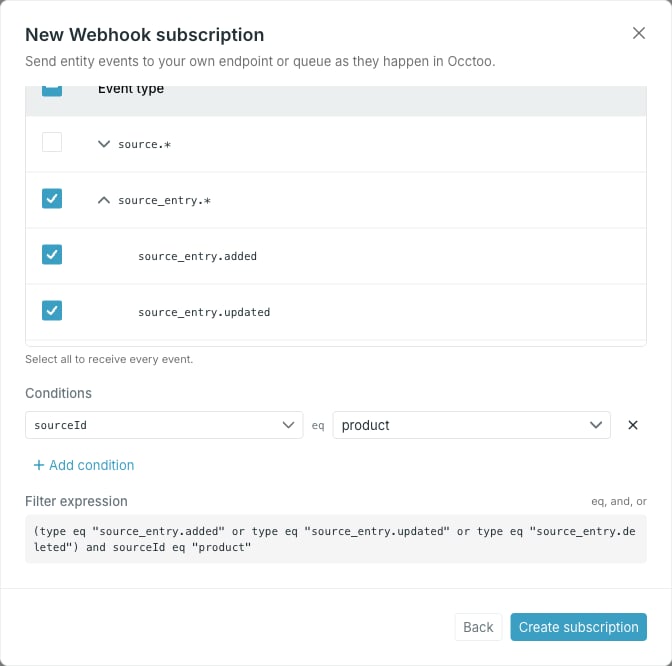
Event types
The tree groups the 30 event types into nine families. Ticking a family row selects every type under it; expand the row to pick individual types. The header checkbox selects all of them, and the counter above the tree tracks how many of the 30 are selected. At least one type is required — the dialog will not create or save a subscription without one.What each type means, and what its payload carries, is listed in the Events API reference.
Conditions
Add condition adds aproperty eq value row. The property list holds only the properties the selected event types actually carry:
Select several families and the list offers the union of their properties.
Type the value for
subject and apiVersion directly. Other properties pick a value from a list of what exists in the environment — sources, card definitions, segments, destinations, endpoints, API versions or users — and send the underlying ID rather than the name you chose.
To filter for one entry when creating or editing a subscription, click Add condition, choose subject, and enter the complete CloudEvent subject. Matching is exact and case-sensitive. Do not split the value on / or .; those characters can be part of an ID. Combine it with the event type and a parent condition such as sourceId or cardDefinitionId to distinguish entries that share an ID. See Filter by subject for the value used by each event family.
Only events processed after subject filtering was enabled can match a subject condition. Older events are not backfilled, even when their payload already contains
subject.The compiled expression
Filter expression shows exactly what Studio sends, in a grammar limited toeq, and and or:
or and bracketed as a group once a condition is present; conditions are appended with and. A condition left without a value is omitted from the expression preview, but it blocks creation and saving. Fill in the value or remove the condition before submitting.