

1
Open the provider menu
On the Data providers tab, press the menu on the provider and choose View code examples.
2
Pick a language and a source
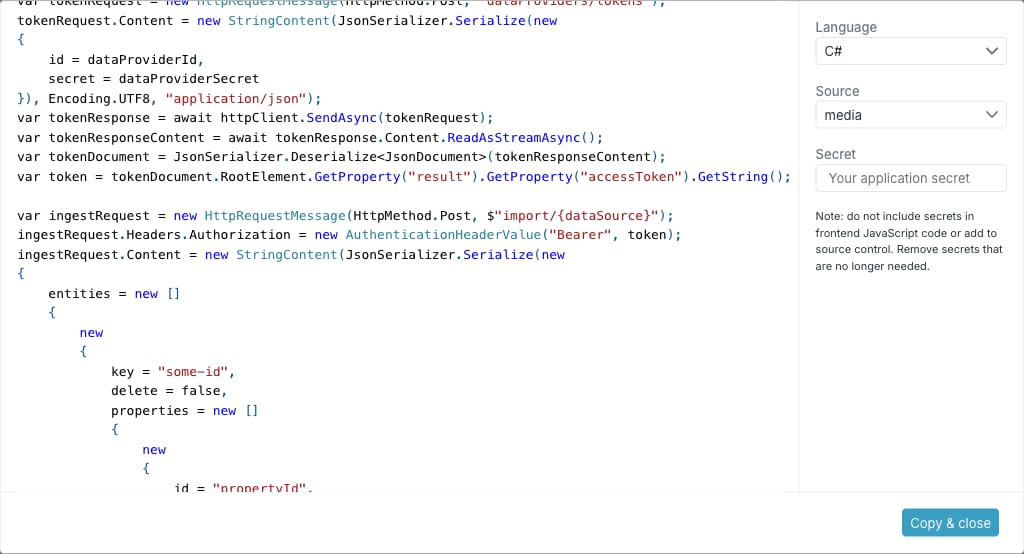
- Language — C# or JavaScript.
- Source — one of the provider’s allowed sources. The snippet is written for the identifier of the source you pick.
- Secret — optional. Paste the provider secret and it is written into the snippet; leave it empty and the snippet carries a placeholder instead.
3
Copy it
Use the copy button above the snippet, or Copy & close to copy and dismiss the dialog.
What the snippet does
Both languages follow the same two steps: post the provider ID and secret to get an access token, then post entries to the import endpoint for the chosen source, with the token as a bearer header. The entity shape is visible in the snippet — akey for the entry ID, a delete flag, and a properties array where each property has an id, a value and an optional language.
The snippet is a starting point for the token and ingest calls. For the full API, see Ingest API overview and Application token.