

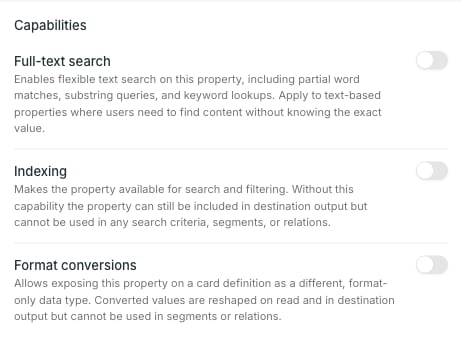
The three capabilities
Full-text search — flexible text search on the property, including partial word and substring matches. For text values users need to find without knowing them exactly. Indexing — makes the property available for search and filtering. Without it the property can still be sent to destinations, but cannot be used in search criteria, segments or relations. Format conversions — lets the property be exposed on a card as a different, format-only data type.Which capabilities appear depends on the property’s data type. A Text property offers all three; a List property offers Indexing and Format conversions but not Full-text search. If none apply to the type, the whole section is hidden.
Indexing decides what is sortable
Only indexed properties can be ordered on. In the entries table, a column header is clickable for sorting when its property has Indexing, and plain text when it does not. The same applies to using the property in segments and relations. Entry ID and Last modified are exceptions — the index tracks both for every source, so they sort without any capability being set.Source format, for timestamps
Turn Indexing on for a Timestamp property and an optional Source format field appears. Set it when the source sends dates in something other than ISO-8601.Source format is only valid for Timestamp. On any other data type the value is dropped rather than sent.
Format conversions
Turn Format conversions on and a list of target types appears.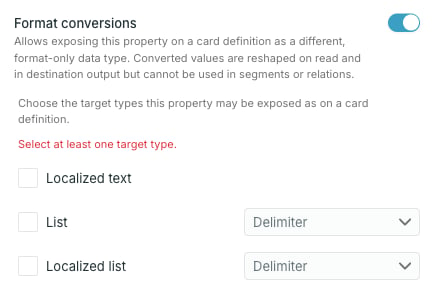
A conversion changes only the shape of the value on read and in destination output. It does not make the property usable in segments or relations — that needs Indexing on the source property itself.
Reading the icons
In the property table each enabled capability shows one icon, named on hover: a magnifier for Full-text search, a database for Indexing, and a compare icon for Format conversions.— means the property has none.